Protect Your ERP from Fraud, Data Leaks, and Compliance Gaps
Detelix delivers real-time monitoring and automated controls for your most sensitive ERP processes. Talk to our experts today.
- The Critical Role of ERP Security in the Modern Enterprise
- Why ERP Systems Are Primary Targets for Cyber Threats
- What Distinguishes ERP System Security from General Enterprise Application Security
- How a Risk-Based Approach Shapes Your ERP Security Priorities
- Essential ERP Access Security: Authentication and Conditional Access
- Role-Based Access Control: Building Clean Roles That Scale
- Segregation of Duties: The Control That Prevents Fraud
- What Happens When Onboarding and Offboarding Are Not Tied to the ERP
- Securing ERP Integrations and API Endpoints
- Continuous Monitoring and Audit Logging
- Patch Management: Balancing Security Updates with Business Continuity
- Five Common Mistakes That Undermine ERP Security Programs
- Incident Response Planning for ERP Environments
- How Detelix Strengthens ERP Security Across the Organization
- Frequently Asked Questions
ERP systems serve as the operational backbone of most organizations, housing financial records, supplier data, payroll details, inventory levels, and customer information within a single interconnected environment. While this centralization drives efficiency, it also concentrates risk. A single misconfigured permission, an unpatched vulnerability, or a weak authentication policy can expose the entire business to fraud, data leakage, and regulatory penalties. Securing this environment demands more than generic IT security checklists; it requires a disciplined, business-aware approach to ERP security best practices that balances protection with operational agility.
Key Takeaways
- ERP systems centralize an organization’s most sensitive financial and operational data, making them prime targets for both external attackers and internal fraud.
- A risk-based approach that prioritizes critical processes such as payments, vendor master data, and payroll delivers the highest security ROI.
- Role-based access control (RBAC) combined with strict segregation of duties (SoD) prevents toxic permission combinations that enable fraud.
- Continuous, real-time monitoring of ERP transactions replaces periodic manual audits with immediate anomaly detection.
- Securing integrations, APIs, and service accounts is essential because these often-overlooked pathways represent significant blind spots.
- Detelix provides an independent control layer that continuously validates ERP controls across procurement, payments, payroll, and more.
The Critical Role of ERP Security in the Modern Enterprise
ERP system security is not merely an IT initiative; it is a core business requirement. The ERP holds what security professionals call the “crown jewels”: bank account details, pricing structures, employee compensation data, and approval workflows that govern how money moves in and out of the organization. When these assets are compromised, the impact is immediate and measurable: unauthorized payments, manipulated financial statements, regulatory fines, and eroded stakeholder trust.
Tip
Start your ERP security assessment by identifying the three to five business processes that would cause the greatest financial damage if compromised. Focus your initial hardening efforts there before expanding to lower-risk areas.
What makes securing an ERP environment unique is the intersection of technology and business process. Unlike a standalone application, an ERP connects procurement to finance, finance to HR, HR to payroll, and all of them to external partners through integrations. Every connection is a potential entry point. Every user with excessive permissions is a potential risk. This is why ERP security best practices must address people, processes, and technology together rather than treating them in isolation.
Why ERP Systems Are Primary Targets for Cyber Threats
Attackers follow the money, and the ERP is where the money lives. A single compromised account with elevated privileges can enable an attacker to change supplier bank details, approve fraudulent payments, or export sensitive customer data, all without triggering traditional perimeter defenses. The path from a compromised credential to a financial transaction can be alarmingly short.
Did You Know
According to a 2025 report by Israel’s National Cyber Directorate, there has been a 350% surge in targeted cyberattack alerts against organizations, with many aimed specifically at business-critical systems like ERPs.
The threat landscape is intensifying. A 2025 report by Israel’s National Cyber Directorate documented this sharp increase in targeted attacks. Simultaneously, research shows that identity-based attacks have become a primary driver of cyber incidents, with attackers exploiting weak or stolen credentials rather than sophisticated zero-day exploits. For ERP environments, this means that enterprise application security must start with who has access and what they can do with it.
What Distinguishes ERP System Security from General Enterprise Application Security
Enterprise application security covers broad principles such as secure development lifecycles, code reviews, and infrastructure hardening across all organizational software. ERP system security narrows the focus to the unique characteristics of ERP platforms: complex permission models tied to business roles, deeply embedded workflows for financial approvals, master data governance, and audit trails that must satisfy both internal auditors and external regulators.
Tip
When evaluating your ERP security posture, map every business process that moves money or modifies master data. Each of these processes requires specific controls that go beyond standard application security measures.
In practice, the distinction matters because a vulnerability in an ERP is not just a technical problem; it is a business process problem. Changing a supplier’s bank account number, for instance, is a legitimate daily operation. The security challenge is ensuring that only authorized personnel can perform it, that every change is logged, and that anomalies are flagged before a payment is executed.
How a Risk-Based Approach Shapes Your ERP Security Priorities
Not all ERP processes carry the same risk. A risk-based approach starts by mapping the processes that, if compromised, would cause the greatest financial or operational damage. Payments, vendor master data changes, month-end closing, payroll runs, and pricing adjustments typically sit at the top of this list.
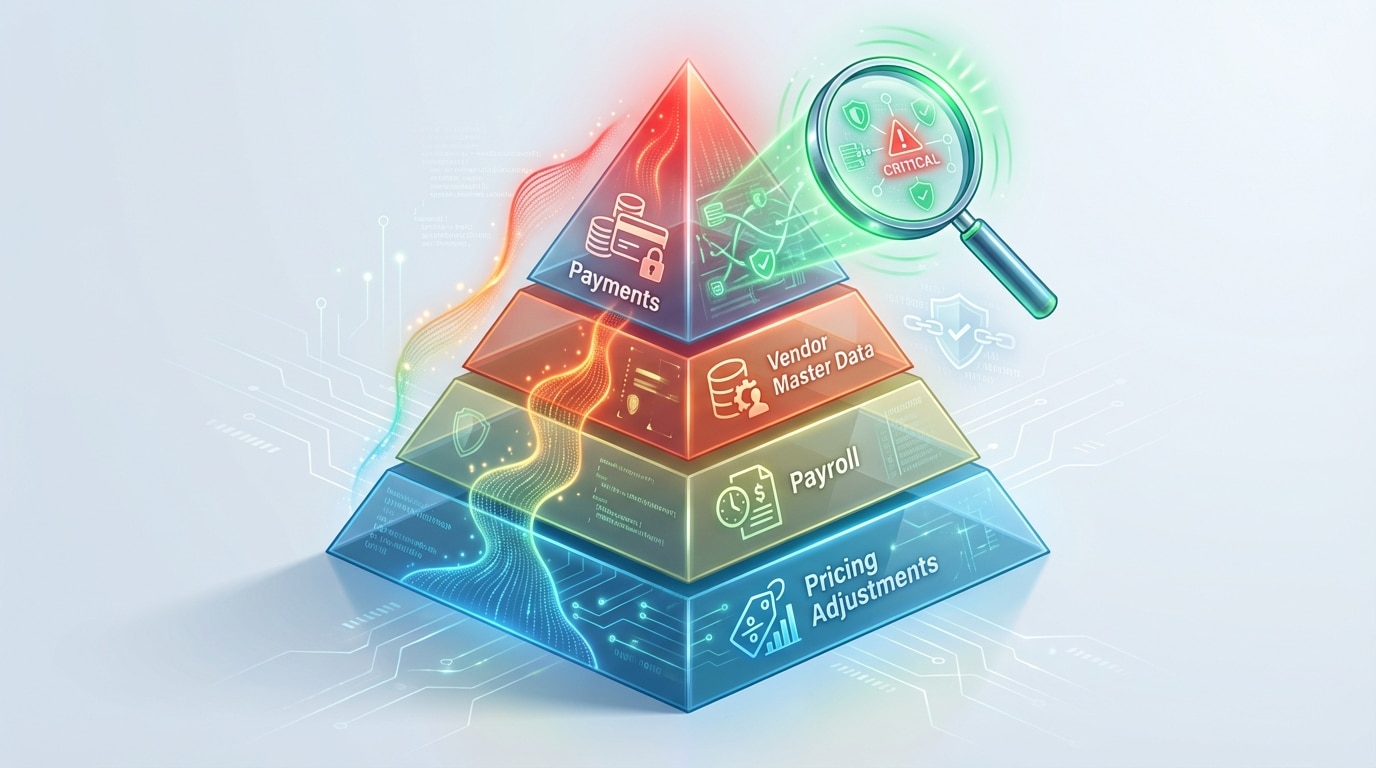
Once critical processes are identified, the next step is to assess each one for exposure: Who has access? Are there segregation-of-duties conflicts? Are changes logged and reviewed? Are integrations secured? This assessment produces a prioritized roadmap, from quick wins like enforcing MFA for privileged users to longer-term projects like redesigning role structures. The Bank of Israel’s Directive 2799 on IT risk management and cybersecurity provides a regulatory framework that reinforces this structured, risk-driven methodology for organizations handling sensitive data.
Did You Know
Organizations that adopt a risk-based prioritization approach to ERP security typically reduce their remediation costs by focusing on the 20% of processes that represent 80% of their financial exposure.
Essential ERP Access Security: Authentication and Conditional Access
Every path into the ERP, whether through web portals, mobile apps, admin consoles, API endpoints, or service integrations, must be secured with strong authentication and context-aware policies. Multi-Factor Authentication (MFA) is no longer optional for any user who interacts with sensitive data. While administrators and finance teams should be the first to receive MFA enforcement, the goal should be universal coverage, with adaptive step-up authentication for high-risk actions such as changing bank details or approving large payments.
Conditional access adds another layer: restricting logins based on device compliance, geographic location, time of day, or risk score. A login attempt from an unmanaged device in an unusual location at 3 AM should trigger a different response than a routine login from a corporate laptop during business hours.
Implementing the Principle of Least Privilege
Least privilege means granting each user only the permissions required to perform their specific tasks and nothing more. In ERP environments, this translates to task-based permission sets rather than broad role assignments. For administrative actions, Just-In-Time (JIT) access is the recommended approach: a user requests elevated privileges for a defined period, with managerial approval and full activity logging. Once the window closes, the elevated access is automatically revoked. This dramatically reduces the window of exposure compared to permanent admin accounts.
Tip
Implement Just-In-Time (JIT) access for all administrative ERP accounts. Require managerial approval with a defined time window, and ensure that elevated privileges are automatically revoked once the window expires.
Role-Based Access Control: Building Clean Roles That Scale
RBAC assigns permissions to defined roles such as Accounts Payable Clerk, Procurement Manager, or Warehouse Operator rather than to individual users. When implemented correctly, it simplifies administration, reduces errors, and makes audits far more manageable. The key principles for healthy role design include keeping roles aligned with business functions, avoiding “super-roles” that bundle unrelated permissions, using consistent naming conventions, and documenting the business justification for each permission within a role.
| Common RBAC Mistake | Business Consequence | Recommended Fix |
|---|---|---|
| Copying permissions from a departing employee to their replacement | Inherited permissions accumulate over time (access creep) | Assign roles based on job description, not predecessor |
| Creating a “catch-all” role for power users | Bypasses segregation of duties | Define separate roles per function; use JIT for exceptions |
| No periodic access review | Orphaned permissions remain active long after they are needed | Quarterly reviews with manager attestation |
| Allowing users to request individual permissions outside roles | Shadow permissions that escape audit | Route all requests through role-based governance |
The transition from flat, ad-hoc permission structures to disciplined RBAC requires upfront effort but pays dividends in reduced risk, faster onboarding, and cleaner audits.
Did You Know
Access creep, where users accumulate permissions over multiple role changes, is one of the most common findings in ERP security audits. Without quarterly access reviews, orphaned permissions can persist for years.
Segregation of Duties: The Control That Prevents Fraud
Segregation of Duties (SoD) is the principle that no single person should control all steps of a sensitive process. In an ERP context, this means the person who creates a vendor record should not be the same person who approves payments to that vendor. The person who enters a purchase order should not also receive the goods and approve the invoice. When these duties are combined, what auditors call “toxic combinations,” the door opens to both deliberate fraud and undetected errors.
A Deloitte analysis of SoD risks in ERP systems highlights that many organizations discover conflicts only during external audits, by which point damage may already have occurred. Proactive detection is essential. This is one area where platforms like Detelix provide significant value: by continuously scanning ERP permission assignments and transaction patterns, Detelix can flag toxic combinations in real time, before a conflicting action is executed rather than after the quarterly review.
Handling SoD Exceptions Without Paralyzing Operations
In smaller teams, pure SoD may not always be feasible. Compensating controls bridge the gap: dual approvals, enhanced monitoring of the user’s transactions, mandatory documentation of every exception, and periodic review by an independent party. The key is that every SoD exception is deliberate, documented, and monitored rather than accidental or ignored.
Your ERP holds your most sensitive financial data. Are your access controls, SoD policies, and monitoring capabilities up to the challenge?
What Happens When Onboarding and Offboarding Are Not Tied to the ERP
One of the most common and most dangerous gaps in ERP access security is the disconnect between HR processes and ERP user management. When an employee leaves and their ERP account remains active for days or weeks, the organization is exposed to unauthorized access. When an employee changes roles and retains their old permissions alongside new ones, access creep compounds over time.
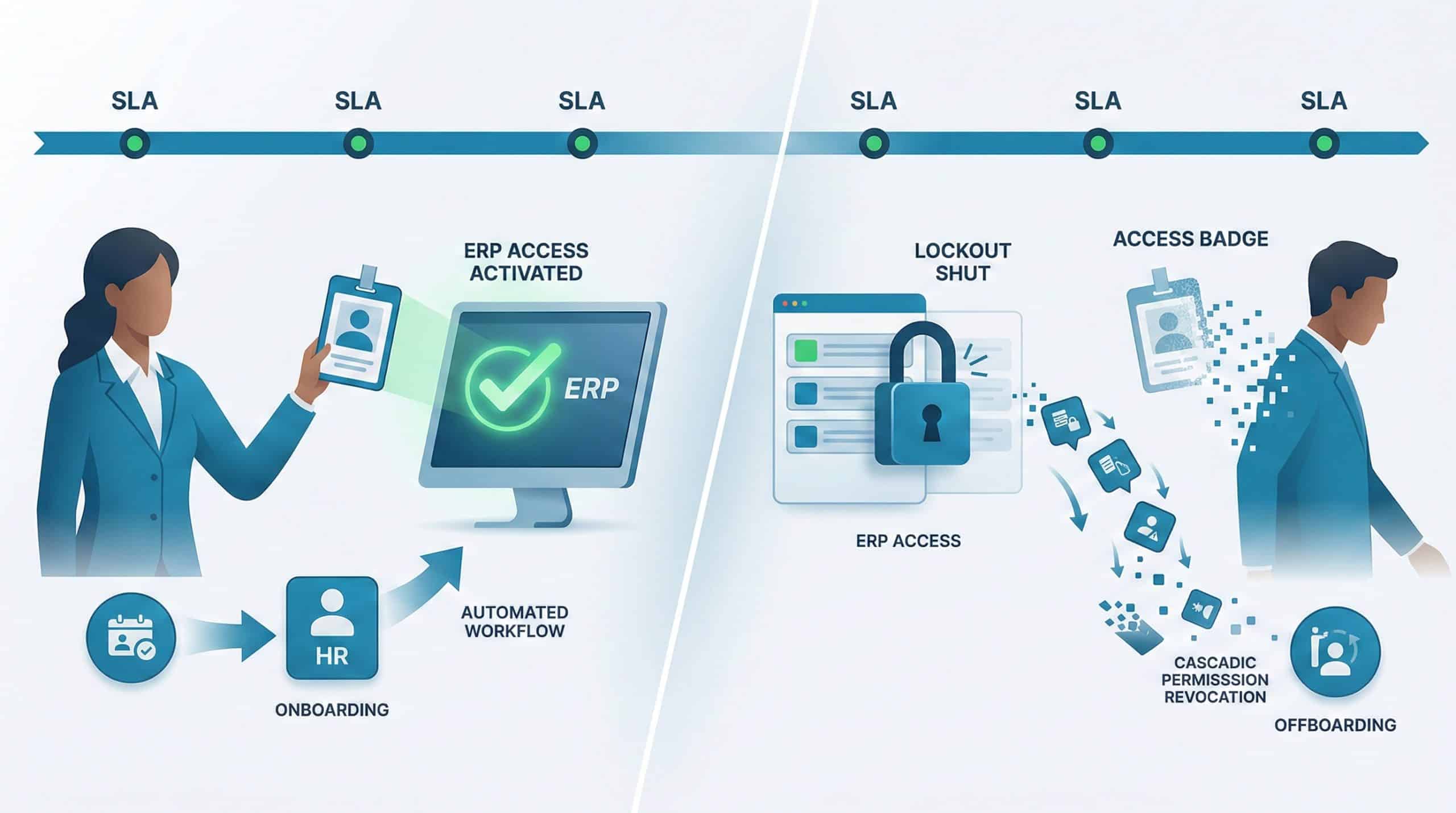
The fix is process integration: HR triggers an automated workflow that creates, modifies, or deactivates ERP accounts with defined SLAs. On the day an employee departs, their ERP access is revoked. When a role change occurs, old permissions are removed before new ones are granted. Service accounts, used by integrations rather than humans, require the same discipline: assigned ownership, managed credentials with rotation schedules, minimal permissions, and continuous monitoring.
Tip
Establish an automated workflow between your HR system and ERP so that account deactivation occurs within hours of an employee’s departure, not days. Apply the same SLA discipline to service accounts used by integrations.
Securing ERP Integrations and API Endpoints
Modern ERP environments rarely operate in isolation. They connect to CRM platforms, business intelligence tools, banking systems, EDI partners, payroll providers, and more. Each integration introduces an additional attack surface. A leaked API key can grant an attacker persistent, silent access to financial data without ever triggering a login alert.
Mandatory Controls for API Security
Strong API security starts with short-lived OAuth tokens rather than static credentials, IP allowlisting where feasible, request signing, rate limiting to prevent abuse, and schema validation to reject malformed requests. For file-based integrations (SFTP, batch transfers), organizations should use managed key pairs with regular rotation, dedicated service accounts with restricted directory access, and monitoring of all file transfer activity. The regulatory guidance in Bank of Israel Directive 2799 specifically addresses API security controls as part of a broader information security framework.
Did You Know
A leaked API key with broad permissions can provide an attacker with persistent, silent access to your ERP’s financial data for months without triggering a single login alert in your security monitoring tools.
Continuous Monitoring and Audit Logging
Controls are only as strong as your ability to verify they are working. Continuous monitoring transforms ERP security from a periodic audit exercise into a real-time capability. At a minimum, the following events should be logged and actively monitored: all login attempts (successful and failed), changes to master data (vendors, customers, bank accounts, pricing), financial transaction approvals and modifications, permission changes and role assignments, data exports and report generation, and configuration changes to the ERP itself.
Logs alone are not enough; they must be analyzed. This is where real-time alerting changes the equation. Instead of reviewing a log file weeks after the fact, your team receives an immediate notification when a vendor’s bank account is changed outside of normal business hours, or when a user who normally processes five transactions per day suddenly executes fifty. Detelix provides this continuous, automated cross-checking across sensitive ERP processes, enabling finance and operations leaders to detect irregular activity as it happens rather than discovering it during the next audit cycle.
| Log Category | Examples | Recommended Retention |
|---|---|---|
| Authentication | Login, logout, failed attempts, MFA events | 12-24 months |
| Master Data Changes | Vendor bank details, customer addresses, pricing | 36+ months (regulatory dependent) |
| Financial Transactions | Payment approvals, journal entries, refunds | 7+ years (per financial regulation) |
| Permission Changes | Role assignment, privilege escalation, deactivation | 24-36 months |
| System Configuration | Workflow changes, integration settings, security parameters | 24+ months |
For a broader checklist of implementation steps, organizations can also reference practical ERP security best practices that cover monitoring tooling alongside other foundational controls.
Tip
Configure real-time alerts for vendor bank account changes that occur outside of standard business hours or that are initiated by users who do not typically handle master data. This single control catches a disproportionate share of payment fraud attempts.
Patch Management: Balancing Security Updates with Business Continuity
Unpatched ERP systems are among the easiest targets for attackers, yet many organizations delay patches out of fear of downtime or regression issues. The solution is a structured patch management workflow: classify each update by severity, test critical and high-severity patches in a sandbox or Dev environment, define maintenance windows that minimize business disruption, and maintain a documented rollback procedure in case a patch causes issues.
Setting SLAs by Vulnerability Severity
Critical vulnerabilities, those actively exploited or enabling remote code execution, should be patched within days. High-severity issues warrant a response within one to two weeks. Medium and low-severity patches can follow a monthly or quarterly cycle. After every patch deployment, the team should verify core functionality: user authentication, permission enforcement, payment processing, integration health, and log generation. Skipping post-patch validation is one of the most common mistakes in securing an ERP environment.
Did You Know
Many organizations delay ERP patches for months due to fear of downtime, yet unpatched ERP vulnerabilities are among the most frequently exploited entry points in financially motivated cyberattacks.
Five Common Mistakes That Undermine ERP Security Programs
Even organizations with mature security programs fall into recurring traps. Recognizing these patterns is the first step toward eliminating them.
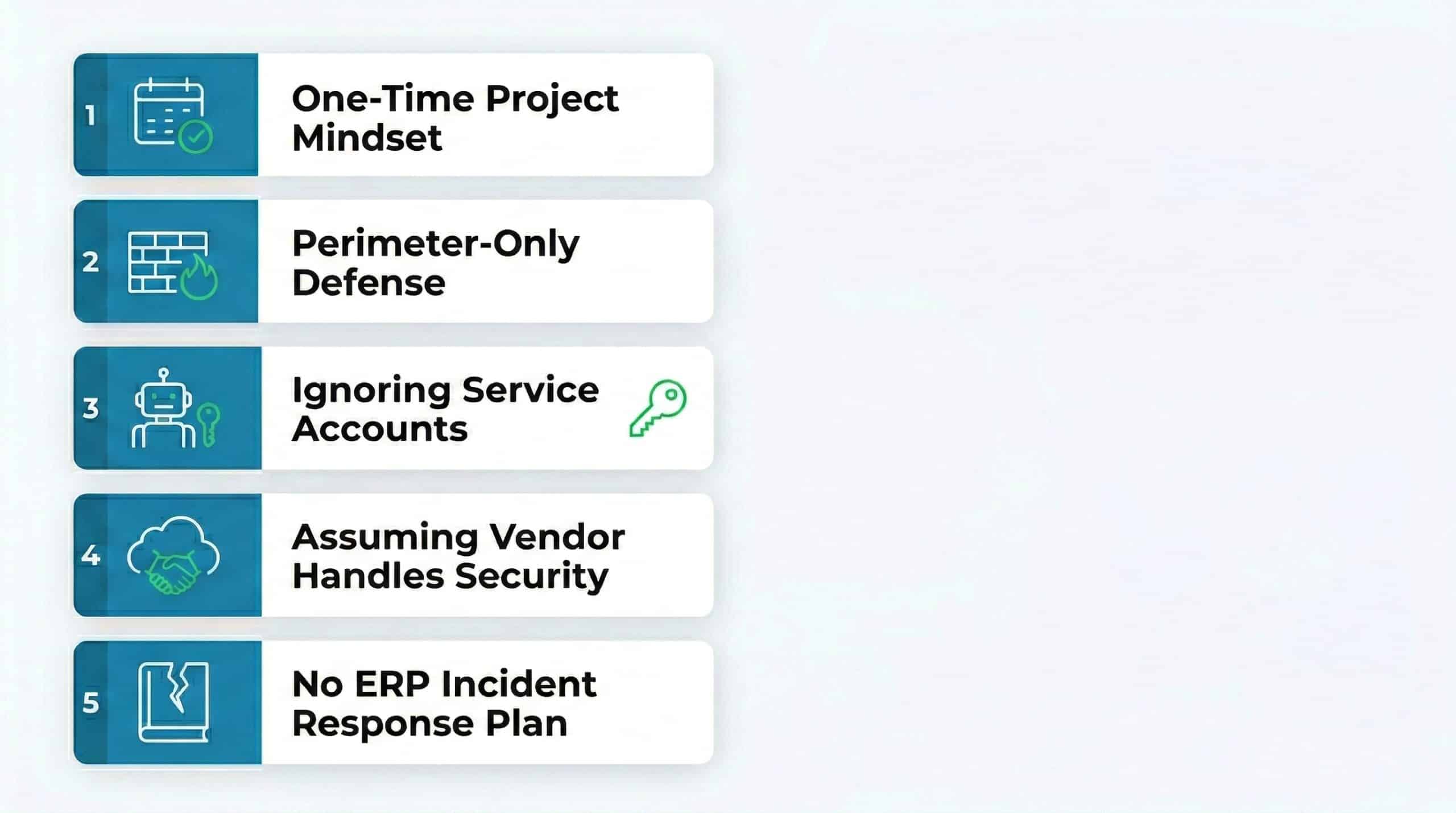
Treating ERP security as a one-time project. Security is an ongoing process. Threats evolve, users change, integrations expand. Without continuous governance, controls degrade over time.
Relying solely on perimeter defenses. Firewalls and network segmentation are necessary but insufficient. If an attacker obtains valid credentials through phishing or credential stuffing, perimeter controls offer no protection inside the ERP.
Ignoring service accounts. Service accounts often have broad permissions and static credentials that are never rotated. They are invisible to standard user access reviews and represent a significant blind spot.
Assuming the ERP vendor handles security. Whether the ERP runs on-premises or in the cloud, the organization remains responsible for access control, data classification, monitoring, and incident response. The shared responsibility model demands active participation from the customer side.
No documented incident response plan for ERP-specific scenarios. A generic IT incident response plan may not address the unique steps required to contain a breach within an ERP: isolating affected modules, preserving transaction logs, validating master data integrity, and communicating with financial stakeholders.
Tip
Audit your service accounts quarterly. For each one, verify that it has an assigned human owner, that its credentials are rotated on schedule, that its permissions are limited to only what the integration requires, and that its activity is actively monitored.
Incident Response Planning for ERP Environments
When a security event occurs in the ERP, the speed and accuracy of your response determines the extent of the damage. An ERP-specific incident response plan should define containment actions (disabling compromised accounts, blocking suspicious integrations), forensic preservation (ensuring logs and transaction records are immutable), business continuity procedures (activating backup processes for critical functions like payments), and communication protocols (notifying internal stakeholders, regulators, and affected parties).
Testing the plan matters as much as writing it. Tabletop exercises that simulate realistic ERP breach scenarios, such as a compromised admin account executing unauthorized vendor payments, help teams identify gaps before a real incident exposes them. Organizations that process personal or sensitive data should also be aware of mandatory reporting obligations, as outlined by Israel’s Privacy Protection Authority regarding reporting severe security incidents.
Did You Know
Organizations that conduct regular tabletop exercises simulating ERP-specific breach scenarios reduce their average incident response time by more than 40% compared to those relying solely on generic IT incident response plans.
How Detelix Strengthens ERP Security Across the Organization
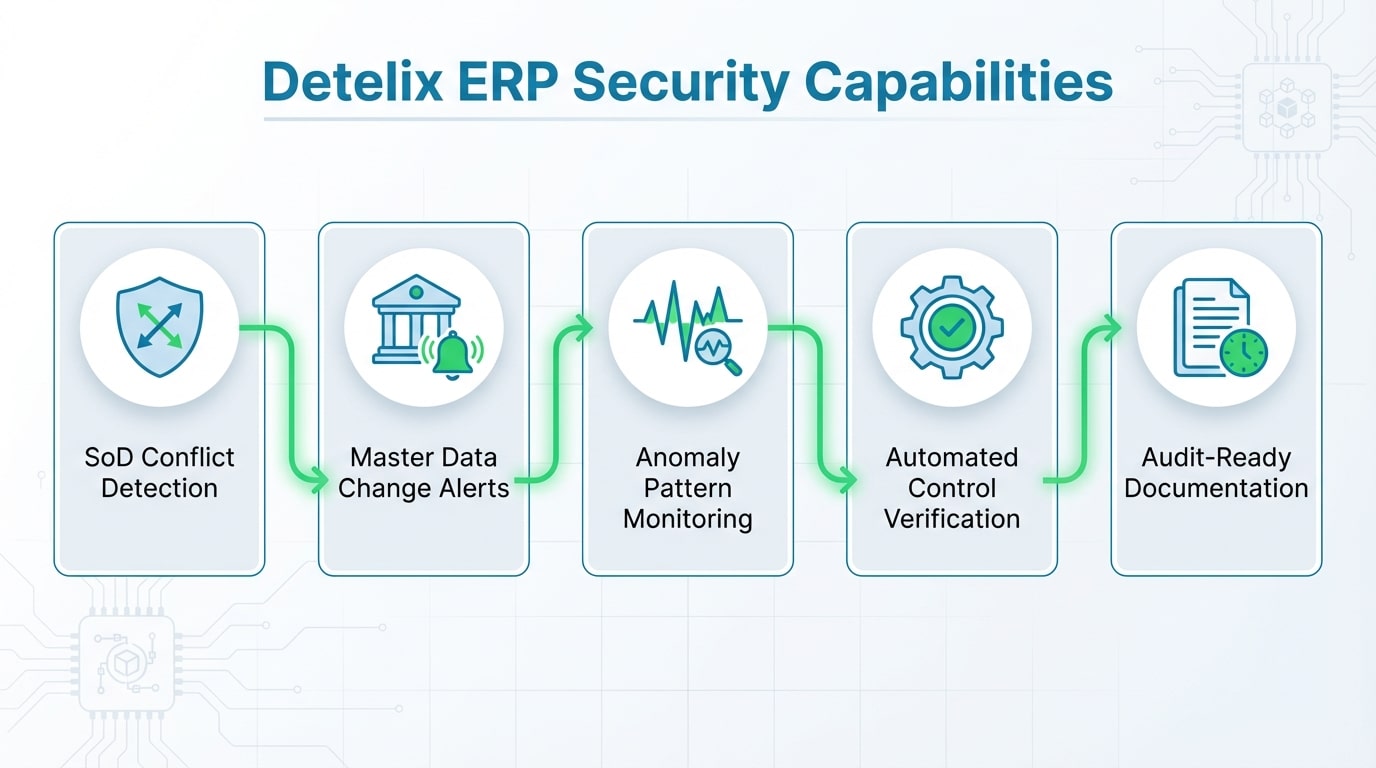
| Business Need | How Detelix Helps in Practice |
|---|---|
| Detecting SoD conflicts and toxic permission combinations | Continuously scans role assignments and flags conflicts before a risky transaction is executed |
| Identifying unauthorized changes to vendor or bank data | Cross-checks every master data change against defined policies and alerts in real time |
| Monitoring unusual transaction patterns | Analyzes volume, timing, and user behavior to surface anomalies that manual reviews miss |
| Reducing dependence on manual audit processes | Automates continuous control verification, freeing finance teams to focus on exceptions |
| Providing audit-ready documentation | Maintains a complete, timestamped record of alerts, investigations, and resolutions |
Detelix operates as an independent control layer over sensitive ERP processes including procurement, payments, payroll, inventory, customer refunds, and bank reconciliations. Rather than replacing existing controls, it validates that they are working as intended and catches what slips through. For finance leaders who need to move from the illusion of control to actual control, this kind of continuous, automated oversight makes a measurable difference.
Detelix ERP Security Solutions

Proactive Monitoring
Continuous, automated oversight of sensitive ERP processes to detect anomalies before they become losses.

Real-Time Alerts
Instant notifications when suspicious transactions, master data changes, or SoD violations are detected.

GateKeeper
Automated enforcement of business rules and approval workflows to prevent unauthorized actions in real time.

Experience & Expertise
Decades of combined experience in ERP security, fraud prevention, and regulatory compliance across industries.
See Detelix in Action
Frequently Asked Questions
Do we need MFA for every ERP user or only for administrators?
Best practice is to enforce MFA for all users who access the ERP, with adaptive step-up authentication for high-risk actions. At a minimum, administrators, finance teams, and anyone with access to master data or payment approvals must use MFA. A standard user account can still become an attacker’s entry point through phishing, so broad coverage significantly reduces risk.
How often should we conduct ERP access reviews?
Quarterly reviews with manager attestation are the most common cadence for organizations balancing thoroughness with operational feasibility. High-privilege accounts and SoD-sensitive roles should be reviewed monthly. Any role change, department transfer, or employee departure should trigger an immediate review outside the regular cycle.
What is the biggest overlooked risk in ERP security?
Service accounts and integration credentials. These accounts often hold broad permissions, use static passwords or API keys that are rarely rotated, and are excluded from standard user access reviews. They represent a persistent, silent risk that many organizations discover only after an incident.
How can we secure an ERP that runs in the cloud versus on-premises?
The core principles of least privilege, MFA, SoD, monitoring, and patching apply to both models. In a cloud ERP, additional attention is needed for identity federation (SSO/IdP integration), data residency and encryption controls, API gateway security, and the shared responsibility model with the cloud vendor. On-premises environments require more focus on network segmentation, physical access controls, and infrastructure patching.
How long should ERP logs be retained?
Retention periods depend on regulatory requirements and business needs. Authentication logs typically require 12 to 24 months. Financial transaction logs should be retained for at least seven years to satisfy most financial regulations. Master data change logs and permission change logs should be kept for 24 to 36 months at minimum. Always verify specific requirements with your legal and compliance teams.
Ready to Move from Periodic Audits to Real-Time ERP Control?
Detelix gives finance and operations leaders full visibility into what is happening inside their ERP right now. Stop discovering problems after the quarterly review.