
Strengthen Financial Controls with Automated Process Oversight
Detelix helps finance teams detect anomalies, enforce compliance, and eliminate hidden risks across every automated workflow. Get a free consultation today.
- What Is Financial Process Automation Software and Who Benefits Most?
- Why Does Finance Digital Transformation Depend on Process Automation?
- Which Financial Processes Should You Automate First?
- End-to-End Automation Versus Point-Task Automation
- How Automation Reduces Errors and Strengthens Control
- Automating Invoice-to-Pay Without Losing Visibility
- How Automation Accelerates the Month-End Close
- Bank Reconciliation: Where Automation Meets Cash-Flow Accuracy
- Does Automation Increase or Decrease Fraud Risk?
- Compliance, Audit Trail, and Segregation of Duties
- Ensuring Data Integrity Across Automated Workflows
- What Integrations Must Your Automation Platform Support?
- A Practical Checklist for Choosing Financial Automation Software
- How Long Does Implementation Take?
- Understanding TCO: What Does Financial Automation Really Cost?
- Measuring ROI: Which KPIs Change After Automation?
- Common Mistakes That Derail Financial Automation Projects
- Does Automation Replace Finance Staff or Elevate Their Roles?
- How Detelix Adds a Protection Layer to Automated Finance
- How to Start an Automation Project Without Getting Stuck
- Frequently Asked Questions
In many organizations, financial controls look robust on paper. Approval workflows exist, ERP permissions are configured, reconciliations run on schedule, and reports land on desks every month. Yet when you examine the processes behind those controls, a different picture emerges: spreadsheets passed between inboxes, manual data entry across disconnected systems, email-based approvals with no audit trail, and inconsistent documentation that crumbles under scrutiny. This gap between perceived control and actual control is precisely where financial process automation software delivers its greatest value. It replaces fragmented, error-prone manual steps with structured digital workflows that enforce policy, capture every action, and provide finance leaders with real-time visibility into what is truly happening across their operations.
Key Takeaways
- Financial process automation software orchestrates entire workflows end-to-end, enforcing policy and capturing a complete audit trail at every stage.
- Automating high-volume, rule-driven processes such as accounts payable and bank reconciliation delivers the fastest measurable ROI.
- Well-designed automation shifts finance teams from reactive error correction to proactive prevention, strengthening internal controls rather than merely accelerating throughput.
- A phased implementation approach, starting with one critical process and expanding after validation, is the most reliable path to sustained success.
- Pairing workflow automation with a real-time monitoring layer like Detelix ensures that automated processes remain accurate, compliant, and protected against both human error and deliberate manipulation.
What Is Financial Process Automation Software and Who Benefits Most?
Financial process automation software is a centralized technological layer that manages, executes, and monitors financial tasks from end to end. Rather than automating a single spreadsheet formula or one approval step, it orchestrates entire workflows — data capture, validation, routing, approval, posting, reconciliation, and reporting — within a governed digital environment. The software typically includes rule-based engines, role-based permissions, audit-trail logging, and integrations with core ERP and accounting systems.
The organizations that benefit most are those dealing with high transaction volumes, multiple approvers, regulatory reporting obligations, and complex supplier or customer ecosystems. Mid-sized companies often see the fastest return because they face enterprise-level complexity without the headcount to absorb manual inefficiency. For any finance team still chasing signatures through email threads, automation is not a luxury — it is a prerequisite for accurate, timely, and controlled operations.
Tip
Before evaluating automation platforms, document your current approval chains for the top five financial processes by volume. This mapping exercise alone often reveals redundant steps, orphaned handoffs, and approval bottlenecks that can be eliminated before any software is deployed.
Why Does Finance Digital Transformation Depend on Process Automation?
Finance digital transformation is frequently misunderstood as a technology upgrade — new dashboards, cloud migration, or mobile access to reports. In reality, transformation happens when the underlying processes themselves become digital, standardized, and self-documenting. Without automating the operational backbone — approvals, reconciliations, exception handling, and compliance checks — new technology only puts a modern interface on outdated manual routines.
Automation delivers the three pillars that make transformation meaningful. First, it eliminates operational friction by removing handoffs that depend on human memory or availability. Second, it enforces policy consistently, so every transaction follows the same rules regardless of who processes it. Third, it generates continuous data about process performance, enabling leaders to spot bottlenecks and improve cycle times with evidence rather than intuition.
Did You Know
According to industry benchmarks, finance teams in organizations without process automation spend up to 60% of their time on manual data collection and reconciliation tasks, leaving less than 40% for analysis, planning, and strategic advisory work.
Which Financial Processes Should You Automate First?
Not every process delivers the same return when automated. The highest immediate ROI typically comes from tasks that are high-volume, repetitive, rule-driven, and prone to manual error. These are the processes where a single mistake — a duplicate payment, a misapplied credit, or a missed approval — can ripple into financial statements, audit findings, or cash-flow disruption.
Identifying Bottlenecks in Your Current Workflow
Start by mapping the time each step takes, the number of handoffs between people, the frequency of corrections or rework, and the volume of exceptions that require manual intervention. Processes where staff spend more time chasing approvals than analyzing data are prime candidates. Common starting points include invoice processing, purchase-order matching, bank reconciliation, expense approval, and month-end task coordination.
What Should You Avoid Automating Too Early?
Processes with unstable or frequently changing policies are poor candidates for an initial rollout. If the rules themselves are still being debated, encoding them into an automated workflow creates rigidity and frustration. Similarly, very low-volume processes — those occurring a few times a year — rarely justify the configuration effort in the first phase. Automate them later, once the platform is established and the team is comfortable.
Tip
Create a simple scoring matrix that ranks each candidate process on four dimensions: transaction volume, error frequency, number of manual handoffs, and regulatory sensitivity. Processes that score high across all four should be your Phase 1 targets.
End-to-End Automation Versus Point-Task Automation: A Critical Distinction
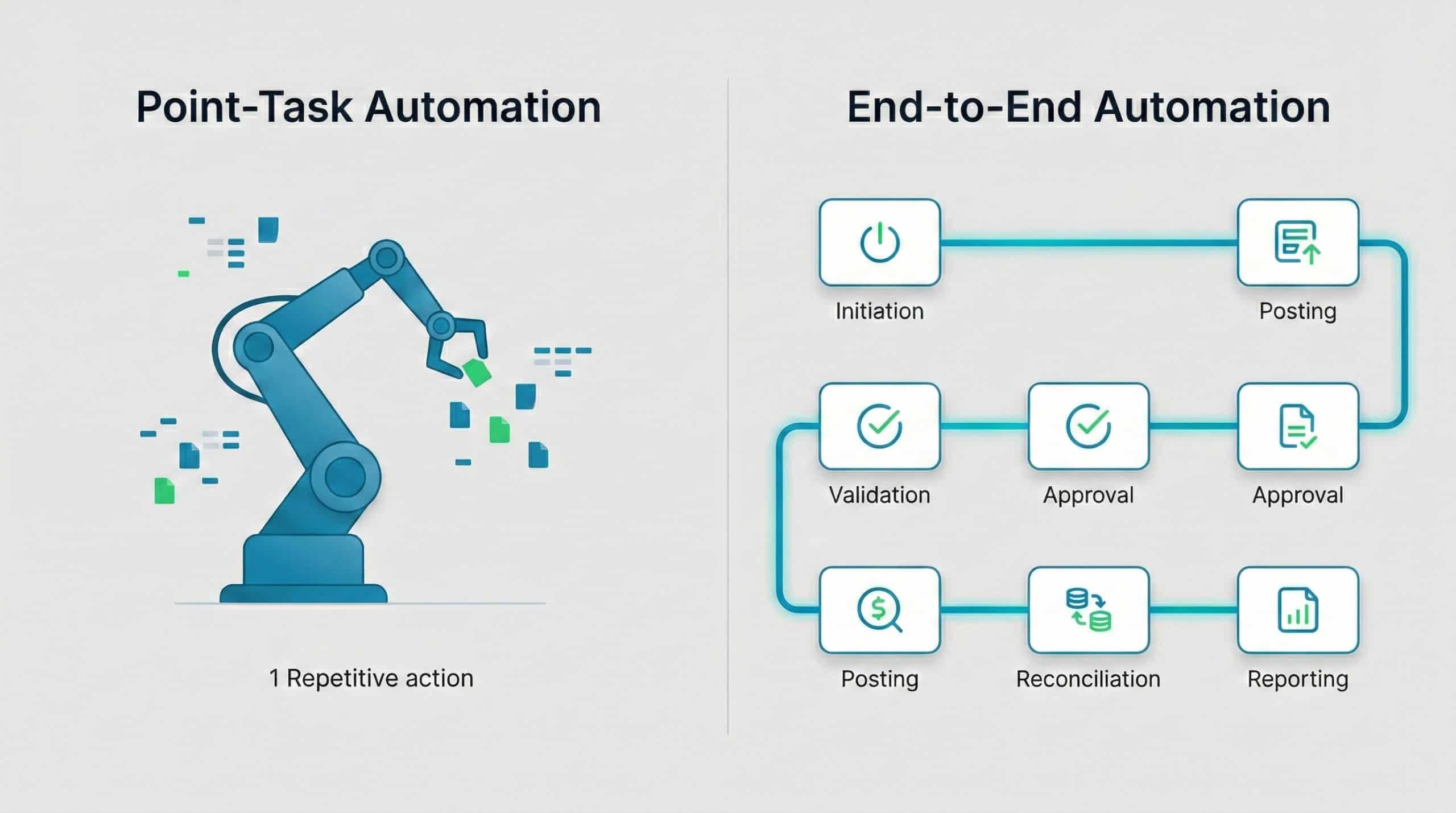
Many organizations begin with point-task automation — an RPA bot that copies data between systems, or a macro that generates a report. While these tools reduce keystrokes, they do not manage the process. They cannot enforce approval sequences, handle exceptions intelligently, or maintain a continuous audit trail across every stage of a transaction.
End-to-end financial workflow automation, by contrast, governs the entire lifecycle. It defines who can initiate, who must approve, what validations run at each stage, how exceptions are routed, and what documentation is retained. The difference is analogous to installing a speed camera on one road versus redesigning the entire traffic system with signals, lanes, and monitoring. For finance leaders who need control — not just speed — end-to-end is the only architecture that delivers.
Did You Know
Organizations that deploy end-to-end workflow automation typically achieve 3 to 5 times higher error-reduction rates compared to those using only point-task bots, because the entire chain of custody is governed rather than isolated steps.
How Does Automation Reduce Errors and Strengthen Control at the Same Time?
Manual financial processes rely on human judgment at every step: reading an invoice, typing a number, choosing the correct account code, remembering to check for duplicates, and forwarding the document to the right approver. Each of these steps is a potential failure point. Automation addresses them systematically through validations (mandatory fields, format checks, range limits), business rules (three-way matching, budget threshold enforcement), and structured routing (approval paths defined by amount, department, or risk level).
The result is not just fewer errors — it is a fundamentally different control posture. Instead of discovering a duplicate payment during the monthly close, the system blocks it at the point of entry. Instead of learning about an unauthorized vendor change from an auditor, the system flags it the moment the change is attempted. This is the shift from reactive correction to proactive prevention, and it is the core promise of well-implemented finance automation solutions.
Tip
When configuring validation rules, focus first on the errors that have the largest financial impact rather than the ones that occur most frequently. A rare but high-value duplicate payment matters far more to your bottom line than a common but trivial formatting inconsistency.
Automating Invoice-to-Pay Without Losing Visibility
The accounts payable cycle — from invoice receipt through matching, approval, scheduling, and payment — is the process most organizations automate first. The volume is high, the rules are relatively well-defined, and the cost of errors (duplicate payments, fraud, late-payment penalties) is immediately measurable.
Recommended Workflow Stages
A robust invoice-to-pay automation flow moves through five stages: capture (OCR or electronic intake), matching (PO, receipt, and invoice alignment), approval (rule-based routing with escalation), payment scheduling (batch creation with controls), and documentation (full audit trail with attached source documents). At each stage, the system enforces validations and logs every action, creating an unbroken chain of evidence.
Managing Exceptions Without Creating a Bottleneck
Exceptions — price variances, missing POs, flagged suppliers — are where automation often stalls if not designed carefully. The solution is a dedicated exception lane with its own SLA, automatic assignment to the appropriate role, and real-time visibility into aging exceptions. This prevents the “black hole” effect where unresolved items accumulate and delay the entire payment cycle. Importantly, automating supplier onboarding itself requires essential checks before adding a supplier to prevent ghost-vendor fraud from entering the system at its source.
Did You Know
Organizations that implement automated three-way matching (PO, receipt, and invoice) typically resolve over 80% of invoices without any human intervention, freeing AP staff to focus exclusively on the exceptions that require judgment.
How Can Automation Accelerate the Month-End Close?
The monthly close is often the most stressful period for finance teams — not because the tasks are complex, but because they depend on coordination, completeness, and timing. Automation transforms the close from a chaotic sprint into a managed sequence. Task checklists become dynamic workflows with dependencies: reconciliation A must complete before journal entry B can be posted, and sign-off C cannot proceed until both are done.
Automated reminders replace follow-up emails. Status dashboards replace verbal check-ins. And because every completed task is timestamped and documented, the close itself becomes an audit-ready artifact. Organizations that adopt close-management automation commonly report a reduction in closing time measured in days, not percentages — freeing staff to focus on analysis rather than data assembly.
Your financial processes deserve more than spreadsheets and email chains. Discover how Detelix monitors every automated workflow for anomalies, policy violations, and hidden risks in real time.
Bank Reconciliation: Where Automation Meets Cash-Flow Accuracy
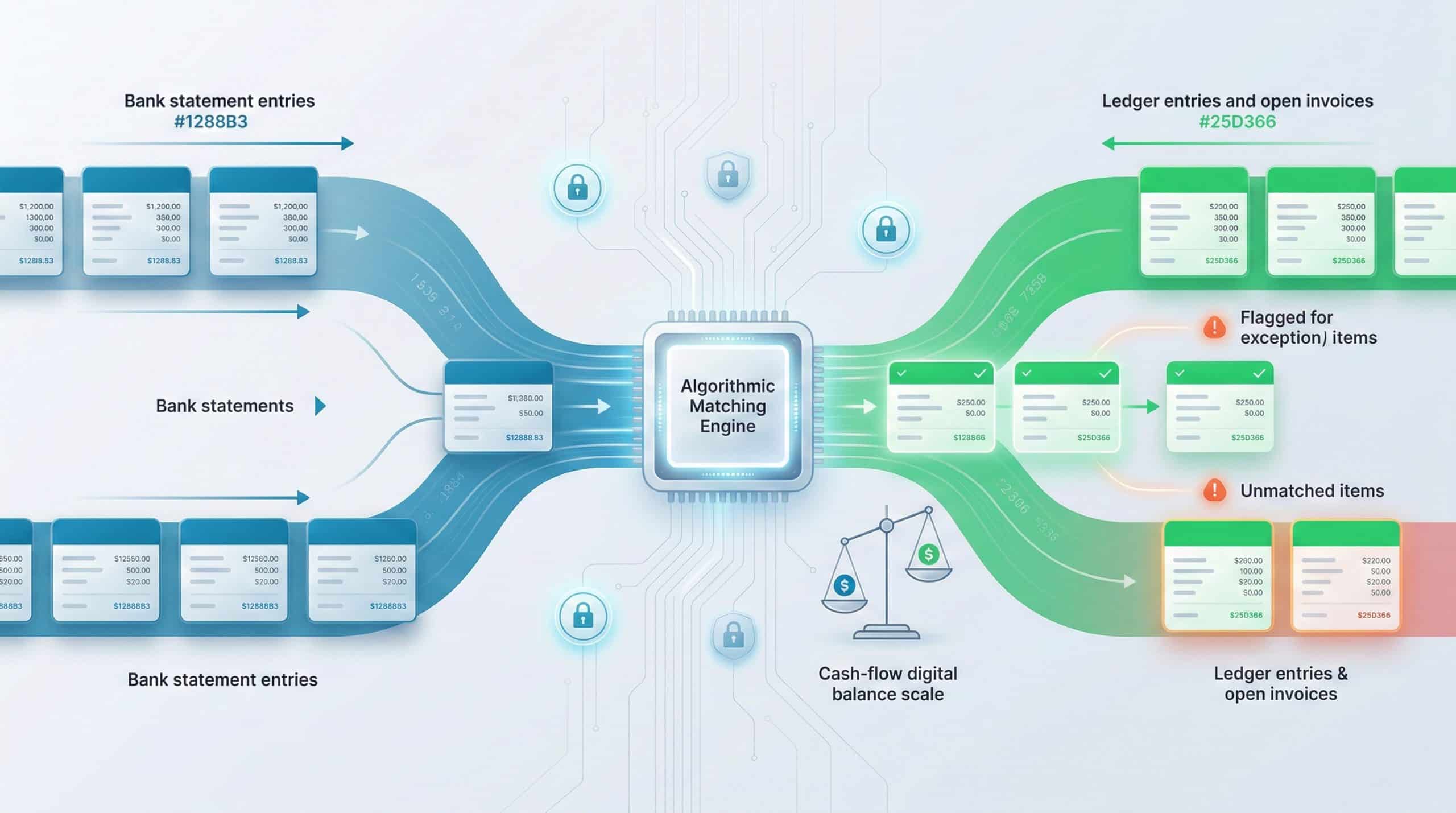
Matching bank statements to open invoices, receipts, and ledger entries is a task that scales poorly with manual effort. As transaction volume grows, the reconciliation backlog grows with it, and discrepancies become harder to trace. Automated bank reconciliation applies matching rules — amount, date, reference number, counterparty — across thousands of transactions simultaneously, flagging only the items that cannot be resolved algorithmically.
Large institutions and universities, for example, manage computerized financial systems that include dedicated bank-reconciliation modules precisely because manual matching at scale is unsustainable. For any organization processing more than a few hundred transactions per month, automated reconciliation is a direct path to faster cash-flow visibility and fewer unreconciled items at close.
Does Automation Increase or Decrease the Risk of Undetected Fraud?
This is one of the most important questions finance leaders ask — and the answer depends entirely on how the automation is designed. Poorly implemented automation can indeed accelerate fraud: if an unauthorized bank-account change propagates through an automated payment run without review, money leaves the organization faster than it would in a manual process. The dangers of changing bank account details inside an ERP are amplified when payments execute automatically.
Well-designed automation, however, provides superior fraud prevention. Every action is logged with a timestamp and user ID. Segregation of duties is enforced programmatically — no single user can both create a vendor and approve a payment. Anomaly-detection rules flag unusual patterns (new bank account + large payment + first-time vendor) in real time. The audit trail is continuous and tamper-resistant, unlike email approvals that can be deleted or modified. In short, automation does not replace control — it makes control enforceable.
Tip
Configure your automation platform to require a mandatory cooling-off period after any bank account detail change on a vendor record. No payment should execute to a newly modified account until the change has been independently verified by a second authorized user.
Compliance, Audit Trail, and Segregation of Duties in Automated Environments
Regulatory and internal-audit requirements demand that organizations demonstrate who did what, when, and why. In a manual environment, this evidence is scattered across emails, signed forms, spreadsheets, and personal files. Automation consolidates it into a single, searchable record. Every approval, rejection, modification, and escalation is captured automatically — no additional effort required from the finance team.
Segregation of duties (SoD) is particularly powerful when enforced by software. Instead of relying on policy manuals and periodic reviews, the system prevents conflicting roles from being assigned and blocks transactions that violate SoD rules in real time. Israeli regulators, for instance, require organizations managing personal data to maintain structured security protocols and role definitions, as outlined in the obligation to notify the Privacy Protection Authority about databases. The same principle applies to financial data: role-based access, documented permissions, and continuous logging are not optional — they are foundational.
Did You Know
A single segregation-of-duties violation that goes undetected can result in audit findings that take weeks to remediate and may trigger regulatory scrutiny. Automated SoD enforcement eliminates these violations at the point of action rather than discovering them months later during an audit review.
Ensuring Data Integrity Across Automated Financial Workflows
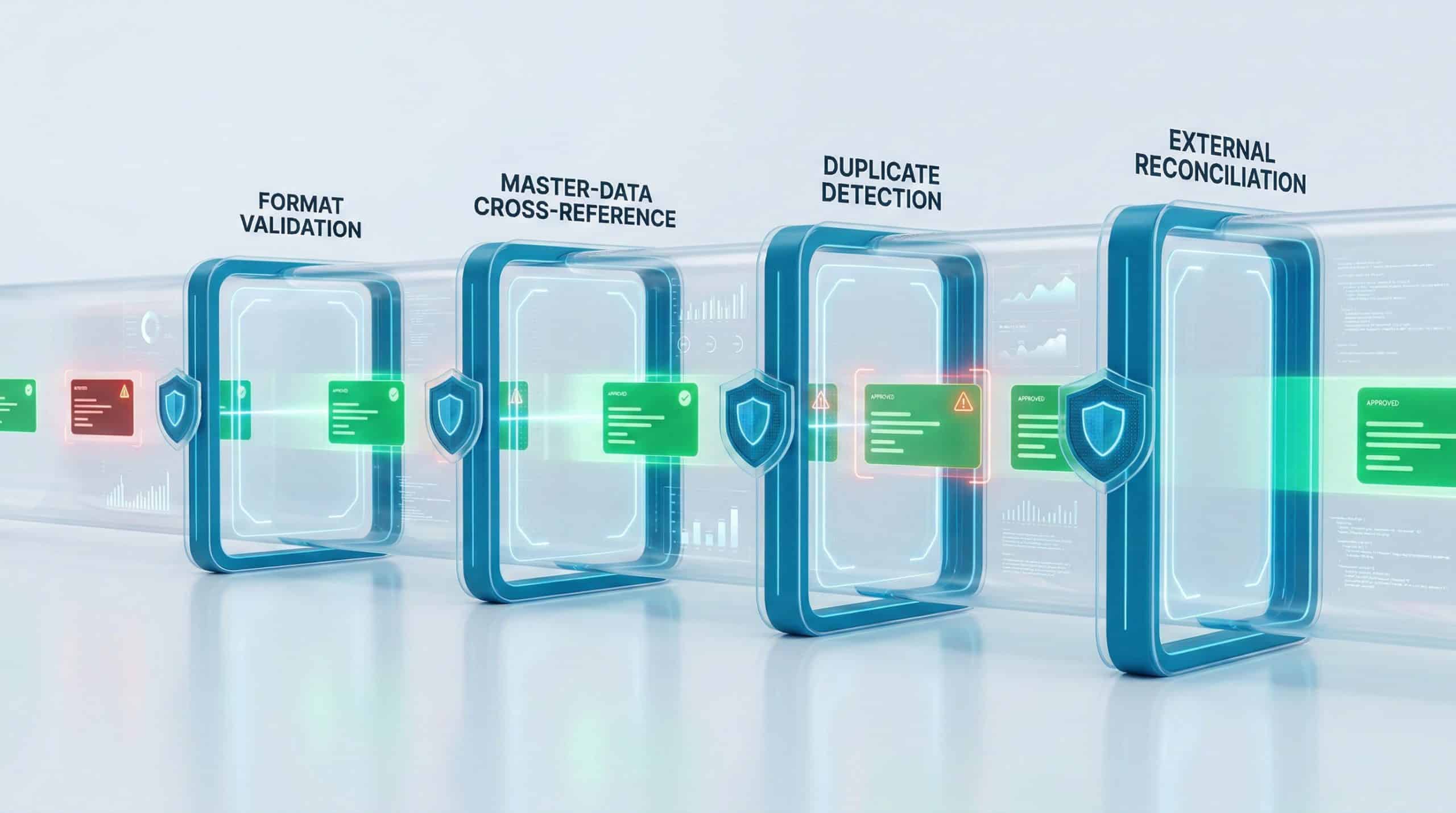
Automation is only as reliable as the data it processes. Garbage in, garbage out applies with particular force in finance, where a misplaced decimal or a duplicated invoice can cascade into material misstatement. Effective financial process automation software includes multiple layers of data validation: format checks at capture, cross-referencing against master data during processing, and reconciliation against external sources before posting.
In Israel, the Tax Authority requires registered accounting software to produce and validate files in a standardized “Uniform Format” (Mivne Achid), and provides a simulator to test file integrity before submission. This regulatory expectation underscores a broader principle: automated systems must include built-in quality gates that prevent bad data from moving downstream. Beyond regulatory files, automation should proactively identify double payments and ghost suppliers using cross-checking algorithms that go beyond what standard ERP validations catch.
Tip
Implement a “data quality scorecard” that runs automatically after each processing cycle. Track metrics such as match rate, exception rate, duplicate detection rate, and master-data completeness. Declining scores signal process drift before it impacts financial statements.
What Integrations Must Your Automation Platform Support?
A financial automation platform that does not integrate deeply with your ERP, accounting system, banking interfaces, and business-intelligence tools will create islands of efficiency surrounded by manual re-entry. The result is often worse than no automation at all, because staff assume the system handles the transfer while data silently falls out of sync.
Critical integration requirements include bi-directional data flow with the core ERP (SAP, Priority, NetSuite, or equivalent), secure bank connectivity for payment files and statement imports, SSO for user authentication, and API access for custom reporting. Before selecting a platform, ask specific questions: How frequently does data synchronize? What happens when a sync fails — does the system alert, retry, or silently skip? Are integration logs accessible for audit review? The answers will tell you whether the platform is truly enterprise-ready or merely demo-ready.
Did You Know
A silent integration failure — where data stops synchronizing but no alert is generated — is one of the most dangerous scenarios in automated finance. Transactions processed during the gap may be posted incorrectly or duplicated, and the discrepancy often is not discovered until the monthly reconciliation.
A Practical Checklist for Choosing Financial Process Automation Software
Selecting the right platform requires input from finance, IT, and operations — each with different priorities. The table below maps the most important evaluation criteria to the stakeholder who typically owns each concern.
| Evaluation Criterion | Primary Stakeholder | What to Verify |
|---|---|---|
| End-to-end workflow coverage (not just task automation) | CFO / Controller | Demo a full process including exceptions and escalations |
| ERP integration depth and sync frequency | IT / ERP Admin | Test with real data in a sandbox environment |
| Audit trail completeness and exportability | Internal Audit | Request a sample audit report from the system |
| SoD enforcement and role-based permissions | Compliance / Risk | Attempt a conflicting action during the demo |
| Exception-handling flexibility | Finance Operations | Change an approval rule and observe system behavior |
| Scalability (users, transactions, entities) | IT / Finance | Ask for reference customers at your scale |
| Implementation timeline and phased rollout support | Project Sponsor | Review the vendor’s implementation methodology |
Tip
During vendor demos, bring a real exception scenario from your own operations and ask the vendor to walk through how their system would handle it. Canned demos always look smooth; real-world edge cases reveal whether the platform is genuinely flexible or merely well-rehearsed.
How Long Does Implementation Take — and What Determines the Timeline?
Implementation duration depends on the number of processes being automated, the complexity of business rules and exceptions, the state of existing data, and the organization’s readiness to standardize. A focused pilot — automating a single high-volume process such as accounts payable — can often go live within weeks. Broader rollouts covering close management, procurement, and reconciliation typically unfold over several months in planned phases.
The most successful implementations follow a wave approach: one process first, validated with measurable KPIs, then expanded to adjacent workflows. This builds internal confidence, surfaces integration issues early, and creates visible wins that accelerate organizational adoption. Attempting to automate everything simultaneously is the single most common cause of stalled projects.
Understanding TCO: What Does Financial Automation Really Cost?
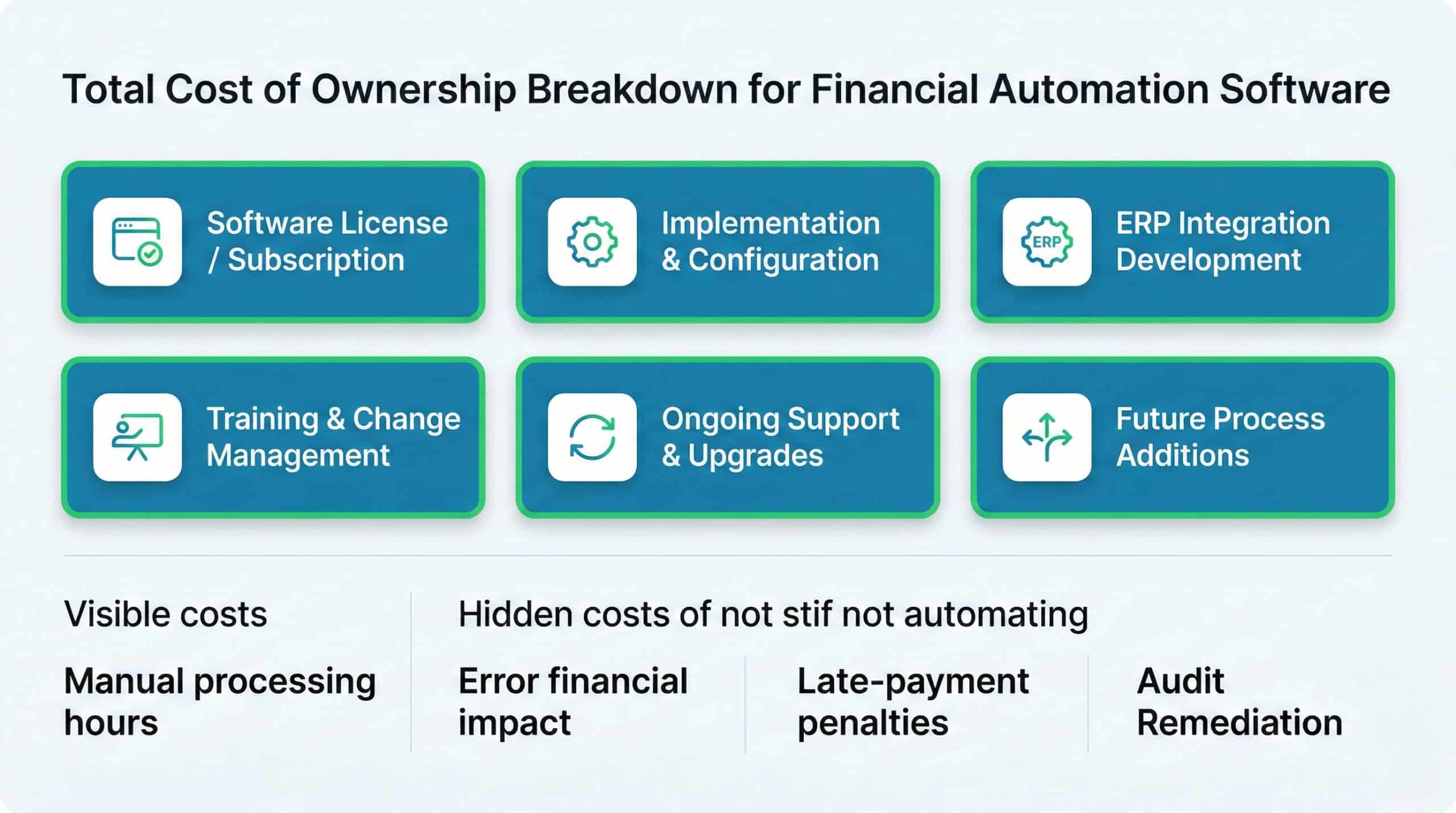
Total cost of ownership extends well beyond the subscription or license fee. A realistic TCO calculation includes implementation services, ERP integration work, internal staff time for configuration and testing, ongoing maintenance, and future change requests. Equally important — and often overlooked — is the cost of not automating: the hours consumed by manual processing, the financial impact of errors, late-payment penalties, audit remediation, and the opportunity cost of finance staff performing clerical work instead of analysis.
| Cost Component | Typically Included in Vendor Quote? | Action Item |
|---|---|---|
| Software license / subscription | Yes | Confirm pricing model (per user, per transaction, flat) |
| Implementation and configuration | Sometimes | Request a fixed-scope SOW for Phase 1 |
| ERP integration development | Rarely | Get a separate integration estimate from your ERP partner |
| Training and change management | Varies | Include internal hours in the project plan |
| Ongoing support and upgrades | Usually | Clarify SLA, response times, and included updates |
| Future process additions | No | Negotiate a framework for adding workflows post-launch |
Did You Know
The average cost of processing a single invoice manually ranges from $12 to $30 depending on the industry, while automated processing typically drops that cost to under $3. For an organization processing 10,000 invoices per year, the difference in AP costs alone can exceed $100,000 annually.
Measuring ROI: Which KPIs Change After Automation?
Return on investment in financial automation is best measured through before-and-after comparisons on specific operational metrics. The most telling indicators include average invoice processing time, number of manual touches per transaction, error and rework rates, days to close the monthly books, percentage of invoices matched automatically, and the volume of unresolved exceptions at any given point.
Organizations that track these KPIs rigorously often find that automation pays for itself within the first year — not through dramatic cost cuts, but through the compounding effect of fewer errors, faster cycles, and better allocation of staff time. The qualitative gains — audit readiness, policy compliance, and leadership confidence — are harder to quantify but equally valuable.
Common Mistakes That Derail Financial Automation Projects
Even well-intentioned automation initiatives fail when organizations skip foundational steps. The most frequent mistakes include automating a broken process without first standardizing it, underestimating the importance of exception handling, treating the project as an IT initiative rather than a finance-led transformation, and neglecting change management. Another critical error is assuming that automation eliminates the need for oversight. In reality, automation shifts oversight from checking individual transactions to monitoring the system itself — its rules, its exceptions, and its integration health.
This is where platforms like Detelix add a distinct layer of value. While your automation software executes workflows, Detelix continuously monitors the data flowing through your ERP to detect anomalies — unauthorized changes, policy deviations, and patterns that suggest error or fraud. It functions as an independent control layer that audits the automation itself, ensuring that as you automate financial processes, you are not also automating undetected risk.
Tip
Assign a “process owner” from the finance team — not IT — to lead each automation initiative. The process owner understands the business rules, the exceptions, and the control requirements. IT provides the technical enablement, but finance must own the workflow logic and the success criteria.
Does Automation Replace Finance Staff or Elevate Their Roles?
In nearly every organization that has implemented financial process automation, the answer is elevation, not elimination. Automation absorbs the repetitive, rule-driven tasks — data entry, matching, routing, and follow-up — that consume the majority of a finance team’s time. What remains is the work that requires judgment: analyzing exceptions, interpreting trends, advising business partners, and strengthening controls. The shift is from “processing” to “controlling,” and it makes finance roles more strategic, more interesting, and more impactful.
How Detelix Adds a Protection Layer to Your Automated Finance Environment
Automation platforms are designed to execute processes efficiently. Detelix is designed to verify that those processes are executing correctly and securely. By continuously scanning ERP data in real time, Detelix cross-checks every action against organizational policy, historical patterns, and risk indicators. It flags irregular supplier changes, unusual payment amounts, SoD violations, and data anomalies before they result in financial loss.
| Business Need | How Detelix Helps in Practice |
|---|---|
| Preventing payment to fraudulent bank accounts | Alerts when bank details change close to a payment run |
| Enforcing segregation of duties | Detects role conflicts and flags transactions that bypass SoD rules |
| Maintaining a complete audit trail | Provides an independent log of all sensitive actions across ERP modules |
| Identifying duplicate or ghost-supplier payments | Cross-references vendor master data, invoice history, and payment patterns |
| Supporting regulatory compliance | Documents control activity for internal and external audit review |
This approach gives finance leaders what dashboards alone cannot: the confidence that their automated processes are not only fast but also accurate, compliant, and protected against both human error and deliberate manipulation.
How to Start an Automation Project Without Getting Stuck Halfway
The most reliable path to successful financial process automation follows a disciplined sequence. Begin by selecting one critical, high-volume process — typically accounts payable or bank reconciliation. Map it thoroughly: every step, every handoff, every exception, every approval rule. Define measurable KPIs (processing time, error rate, cycle length) so you can demonstrate results objectively. Build the workflow in the automation platform, connect the necessary ERP integrations, and run a controlled pilot with a subset of transactions. Validate the results against your KPIs, adjust rules and exception paths, then expand to full volume. Only after the first process is stable should you move to the next.
This phased approach builds organizational trust, surfaces technical issues at manageable scale, and creates the internal expertise needed to accelerate subsequent rollouts. It also provides the early evidence that justifies continued investment — turning a technology initiative into a demonstrated business improvement.
Are your current financial processes giving you real control, or just the appearance of it? If you are ready to move from manual routines to structured, monitored, and protected automation, the next step is a focused conversation about your specific workflows and risks. Reach out to the Detelix team to explore how real-time oversight can strengthen every automated process in your finance operation.
Detelix ERP Monitoring and Fraud Prevention Solutions

Proactive Monitoring
Continuous scanning of ERP transactions and master data changes to detect anomalies before they become financial losses.

Real-Time Alerts
Instant notifications when suspicious activities, policy violations, or unauthorized changes occur within your financial systems.

GateKeeper
Automated enforcement of segregation of duties and approval workflows to prevent fraud and ensure compliance at every transaction.

Experience
Deep domain expertise in ERP security, financial controls, and regulatory compliance built from years of protecting enterprise organizations.
See Detelix in Action
Frequently Asked Questions
Is financial process automation software suitable for mid-sized businesses, or only for enterprises?
Mid-sized businesses often see the fastest ROI because they face process complexity similar to enterprises but lack the staff to absorb manual inefficiency. Modern platforms offer modular deployment, allowing organizations to start with a single workflow and scale gradually without enterprise-level budgets.
How does automated financial software handle regulatory requirements specific to Israel?
Reputable platforms support Israeli regulatory needs such as producing files in the Uniform Format required by the Tax Authority, managing digital authorizations as defined by the digital operations authorization framework, and maintaining data-protection standards aligned with Privacy Protection Authority regulations. Always verify these capabilities during vendor evaluation.
Can automation coexist with existing ERP systems, or does it require a full replacement?
Financial automation software is designed to integrate with — not replace — existing ERPs. It adds a process orchestration and control layer on top of systems like SAP, Priority, or NetSuite, communicating through APIs or standard connectors. The ERP remains the system of record; the automation platform manages the workflow around it.
What happens if the automation system goes down — do financial processes stop?
Enterprise-grade platforms include high-availability architecture, failover mechanisms, and defined recovery procedures. During vendor selection, review the SLA for uptime guarantees, ask about disaster-recovery protocols, and confirm that critical transactions can be processed manually as a fallback until the system is restored.
How do you ensure that automation does not simply automate existing errors faster?
Process standardization must precede automation. Map the current workflow, identify inconsistencies and workarounds, define the target-state rules, and validate them with stakeholders before encoding them into the platform. Additionally, deploying a real-time monitoring layer — such as Detelix — provides continuous verification that the automated process is producing correct, policy-compliant outcomes.
Ready to Automate with Confidence?
Stop relying on manual checks and fragmented controls. Let Detelix provide the real-time oversight your automated finance environment demands — protecting every transaction, every workflow, every day.