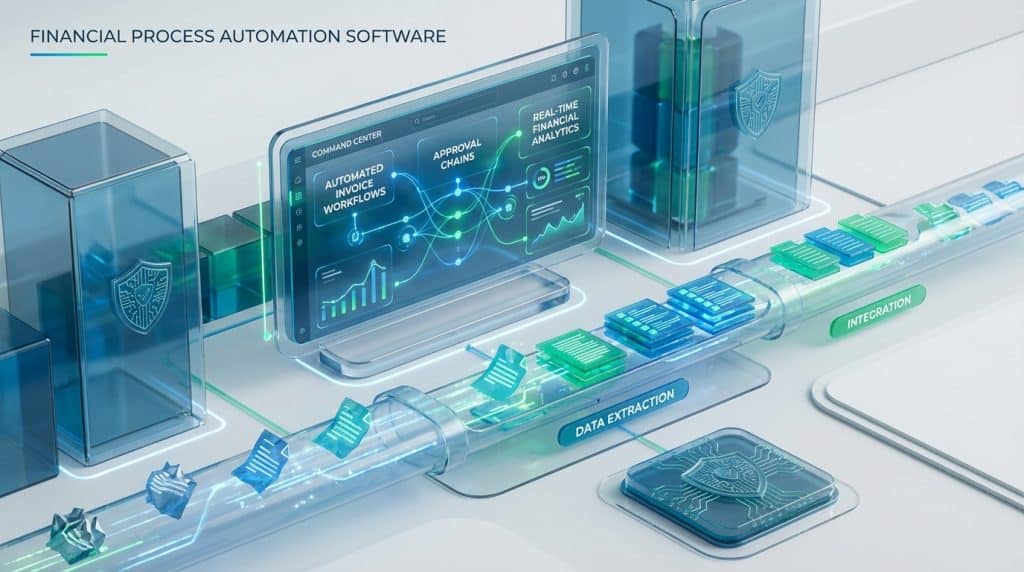
Automate Financial Processes Without Losing Control
Detelix provides continuous ERP monitoring and fraud prevention so your automation delivers speed and governance together.
- Why Are Organizations Investing in Finance Automation Right Now?
- Which Financial Processes Should You Automate First?
- What Does End-to-End Automation Look Like?
- How Does Financial Workflow Automation Differ from RPA?
- What Role Does Intelligent Document Processing Play?
- A Common Mistake: Automating Without Building Controls
- How Does Automation Strengthen Compliance and Auditability?
- Scenario: What Happens When a Duplicate Invoice Slips Through?
- How Do You Calculate ROI for Financial Process Automation?
- How Long Does It Take to Implement?
- What Criteria Matter Most When Selecting a Solution?
- Must-Have Capabilities for Any Financial Workflow Automation Platform
- How Does Automation Support Financial Close and Reporting?
- Connecting Financial Process Automation Software to Your ERP
- What Are the Risks of Automation and How Do You Mitigate Them?
- Comparing Approaches: Workflow Automation vs. BPM vs. ERP-Native
- How Does Automation Reduce Human Error in Sensitive Financial Data?
- Implementation Roadmap: From Pilot to Enterprise Scale
- What Should the Finance Team’s Role Look Like After Automation?
- Frequently Asked Questions
Financial controls in many organizations appear solid at first glance. Approval chains exist, ERP permissions are configured, and monthly reconciliations happen on schedule. Yet beneath that surface, manual handoffs, inconsistent data entry, and fragmented spreadsheets quietly erode accuracy and expose the business to risk. Financial process automation software addresses this gap by creating a centralized, rule-driven layer that orchestrates every step from document capture through approval routing to final posting, so your finance team can shift from chasing tasks to exercising real control. As regulatory bodies sharpen their focus on IT risk governance and data protection, the window for relying on manual workarounds is closing fast. Working with a team of experts providing effective protection over ERP-driven processes is no longer optional; it is a strategic imperative for any CFO who wants visibility, accuracy, and audit-readiness built into every transaction.
Key Takeaways
- Financial process automation software replaces manual handoffs with rule-driven workflows that enforce controls at every stage, from document capture to payment posting.
- Automating high-volume processes like invoice approval, expense management, and supplier onboarding delivers measurable ROI within the first year, including 40-70% cost-per-invoice reductions.
- Embedding governance controls such as Separation of Duties, role-based thresholds, and immutable audit trails from day one prevents automation from amplifying existing risks.
- A layered approach combining workflow automation, intelligent document processing, and continuous ERP monitoring (like Detelix) provides both speed and independent oversight.
- Phased implementation starting with a focused pilot protects budget, builds organizational confidence, and enables iterative improvement before enterprise-wide rollout.
Why Are Organizations Investing in Finance Automation Right Now?
Three forces are converging. First, transaction volumes keep climbing while headcount stays flat, meaning each analyst handles more invoices, more reconciliations, and more exceptions every quarter. Second, hybrid and distributed work models make it harder to rely on in-person approvals or physical document routing. Third, regulators are tightening expectations around IT risk management and cybersecurity in financial systems. The Bank of Israel, for example, published a draft directive on IT risk, information security, and cyber governance that underscores the need for controlled, auditable processes even when those processes are automated.
Tip
Before launching any automation initiative, map your current approval chains end-to-end and identify where manual handoffs create delays or data-entry errors. This baseline gives you concrete metrics to measure automation ROI against.
The real catalyst, however, is strategic. Finance digital transformation is not about installing a tool; it is about redesigning how the finance function operates. Standardized workflows replace tribal knowledge. Real-time dashboards replace month-end scrambles. Automated validations replace hope-based checking. When those shifts happen together, the finance team evolves from data gatherers into strategic advisors who can inform business decisions with confidence.
Which Financial Processes Should You Automate First?
Not every process deserves automation on day one. The highest ROI comes from targeting workflows that are high-volume, repetitive, and prone to bottlenecks. Invoice approval is the classic starting point: it touches procurement, finance, and operations, and delays here directly affect supplier relationships and cash flow. Expense management follows closely because manual expense reports are time-consuming for submitters and reviewers alike. Supplier onboarding is another strong candidate, because inconsistent master-data entry creates downstream payment errors and even fraud exposure. Before you add a new vendor to your ERP, consider the 5 essential checks before adding a supplier to prevent costly mistakes from the outset.
Did You Know
Organizations that automate their accounts payable process typically reduce cost-per-invoice by 40-70%, while cutting average approval cycle times by more than half. The largest gains come not from processing speed alone, but from eliminating manual re-keying errors that trigger payment disputes and reconciliation delays.
What Does End-to-End Automation Look Like in a Finance Department?
End-to-end means the system handles data capture, validation, routing, recording, payment preparation, reconciliation, and reporting with human intervention only where a decision or exception requires it. A purchase invoice, for instance, arrives via email or scan. The automation layer extracts key fields, matches them against the purchase order and goods receipt, flags discrepancies, routes clean invoices for approval based on amount thresholds and cost-center rules, posts the approved entry to the ERP, and queues the payment. Automated invoice processing follows well-defined stages of capture, extraction, and validation before feeding data into downstream systems, as described in detail by leading IDP providers.
The result is a process where people add judgment, not keystrokes. Exceptions are surfaced proactively with SLA timers, so nothing sits in a queue unnoticed. Every action is logged, every approval timestamped, and every override documented.
How Does Financial Workflow Automation Differ from RPA?
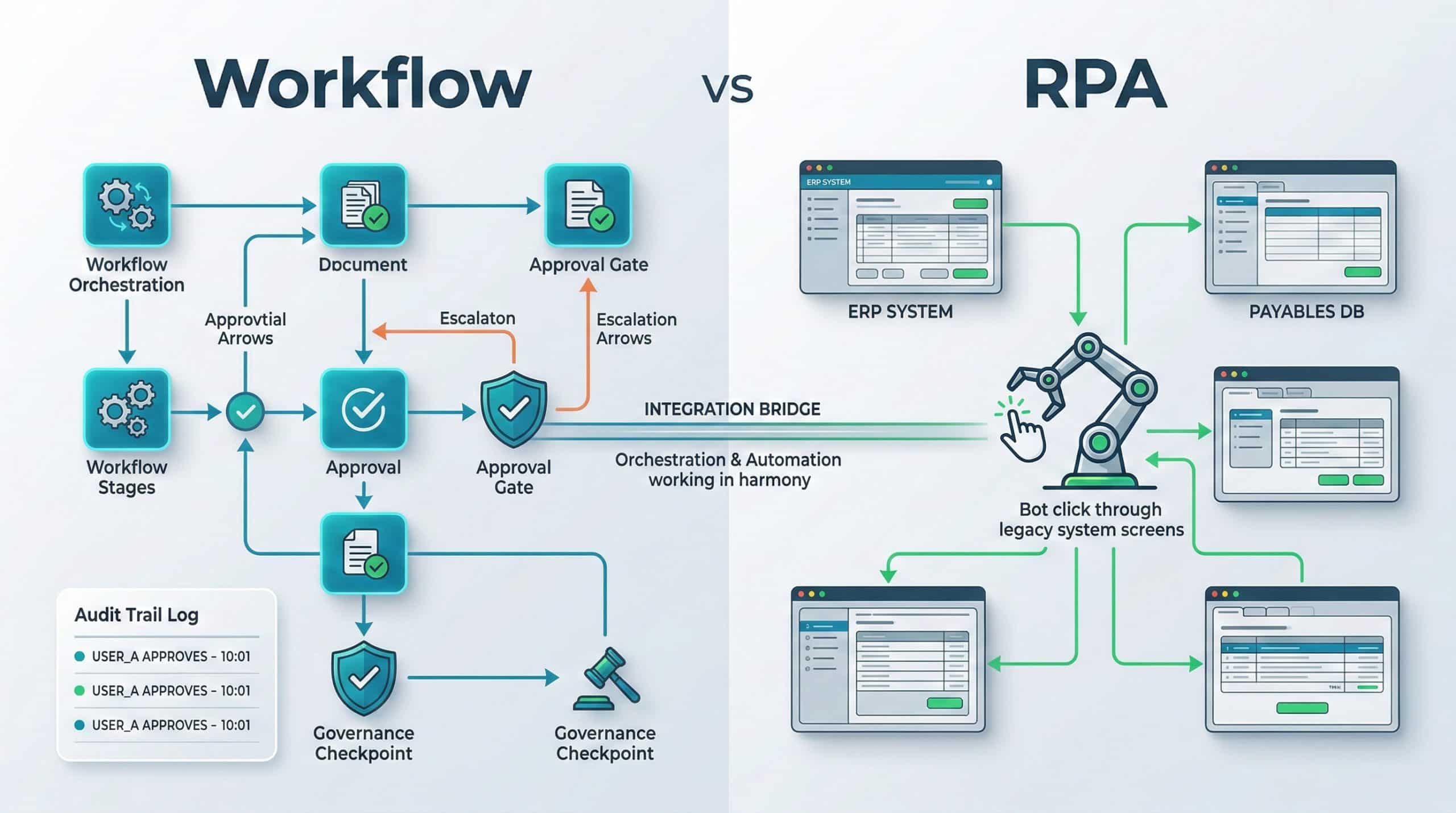
This is one of the most common points of confusion. Workflow automation manages the process itself: it defines stages, assigns owners, enforces rules, escalates delays, and maintains a full audit trail. RPA, by contrast, mimics a human user clicking through screens, useful when you need to bridge legacy systems that lack APIs. The two are complementary, not interchangeable. Workflow excels at governance, accountability, and process-level visibility. RPA excels at tactical data transfer between disconnected systems. Many mature finance automation solutions combine both, using workflow as the orchestration brain and RPA bots as execution hands where native integration is unavailable.
Tip
When evaluating whether to use workflow automation or RPA for a specific process, ask this question: does this task require enforcing rules and accountability, or does it require mimicking mouse clicks across a legacy interface? If the answer is rules, choose workflow. If the answer is screen interaction with no API, choose RPA. If both, layer them together.
What Role Does Intelligent Document Processing Play?
Intelligent Document Processing (IDP) sits at the front door of automation. It converts unstructured inputs like PDFs, scanned invoices, email attachments, and contracts into structured data that workflows can act on. IDP leverages AI and machine-learning models trained on document types to extract fields like vendor name, invoice number, line items, tax amounts, and due dates. As one leading platform explains, IDP handles structured, semi-structured, and unstructured documents alike, making it far more versatile than traditional OCR alone.
That said, no extraction engine achieves perfect accuracy on every document. OCR specialists note that recognition rates depend on scan quality, font variety, and language complexity, which is why a well-designed automation flow includes a confidence threshold and a human-in-the-loop validation step for low-confidence extractions. The goal is not to eliminate people; it is to route their attention only where it genuinely matters.
Did You Know
Modern IDP engines trained on financial documents can achieve extraction accuracy above 95% for standard invoice fields. The remaining 5% typically involves handwritten notes, unusual layouts, or poor scan quality, which is why a confidence-score threshold with human review is essential for maintaining data integrity.
A Common Mistake: Automating Without Building Controls Into the Design
Speed without governance is a recipe for amplified risk. One of the most frequent errors organizations make is rushing to automate a process exactly as it exists today, including its gaps. If your current invoice approval flow lacks Separation of Duties, automating it simply means the same person can approve the same transaction faster, with less visibility. A well-architected financial process automation software deployment starts by mapping the control requirements alongside the workflow steps.
Which Controls Should Be Embedded From Version One?
At minimum, your first automated workflow should enforce role-based approval thresholds, prevent a single user from both creating and approving a transaction, lock critical fields like bank account details once validated, and generate an immutable log for every action. These are not optional enhancements; they are the foundation of auditability.
Tip
Create a control-requirements matrix before you configure any workflow. List every control point (approval threshold, SoD rule, field lock, audit log event) alongside the process step it applies to. This document becomes both your implementation guide and your audit evidence.
How Do You Handle Exceptions Without Breaking the Automation?
Build a dedicated exception path into the workflow. When a transaction fails validation, say the invoice amount exceeds the PO by more than a defined percentage, the system should tag the reason, route the item to an authorized reviewer with an SLA timer, and log the resolution. This way, exceptions are managed within the process, not outside it.
How Does Automation Strengthen Compliance and Auditability?
Every automated workflow is inherently more auditable than a manual one, because the system records who did what, when, and why at every stage. For organizations subject to data-protection regulations, this matters enormously. The Israeli Privacy Protection Authority requires that security incidents in data repositories be reported with supporting evidence, including logs and monitoring screenshots, as outlined in the official incident-reporting form. If your workflows already produce detailed audit trails, you are in a far stronger position to respond quickly and credibly.
Similarly, when automation handles personal data such as vendor bank details, employee payroll information, and customer records, conducting a Data Protection Impact Assessment (DPIA) is a recommended practice. The Privacy Protection Authority’s digital DPIA tool provides a structured way to identify risks and assign mitigation responsibilities, especially when third-party vendors are involved.
For CFOs concerned about ERP-level fraud, consider how easily bank account details can be manipulated if changes are not monitored in real time. Understanding the dangers of changing bank account details in ERP systems is a critical step toward designing automated controls that flag unauthorized master-data modifications before a payment is released.
Did You Know
The Israeli Privacy Protection Authority requires organizations to report security incidents involving personal data repositories within 72 hours, including full supporting evidence such as system logs and monitoring screenshots. Organizations with automated audit trails can typically compile this evidence in hours rather than days.
Scenario: What Happens When a Duplicate Invoice Slips Through?
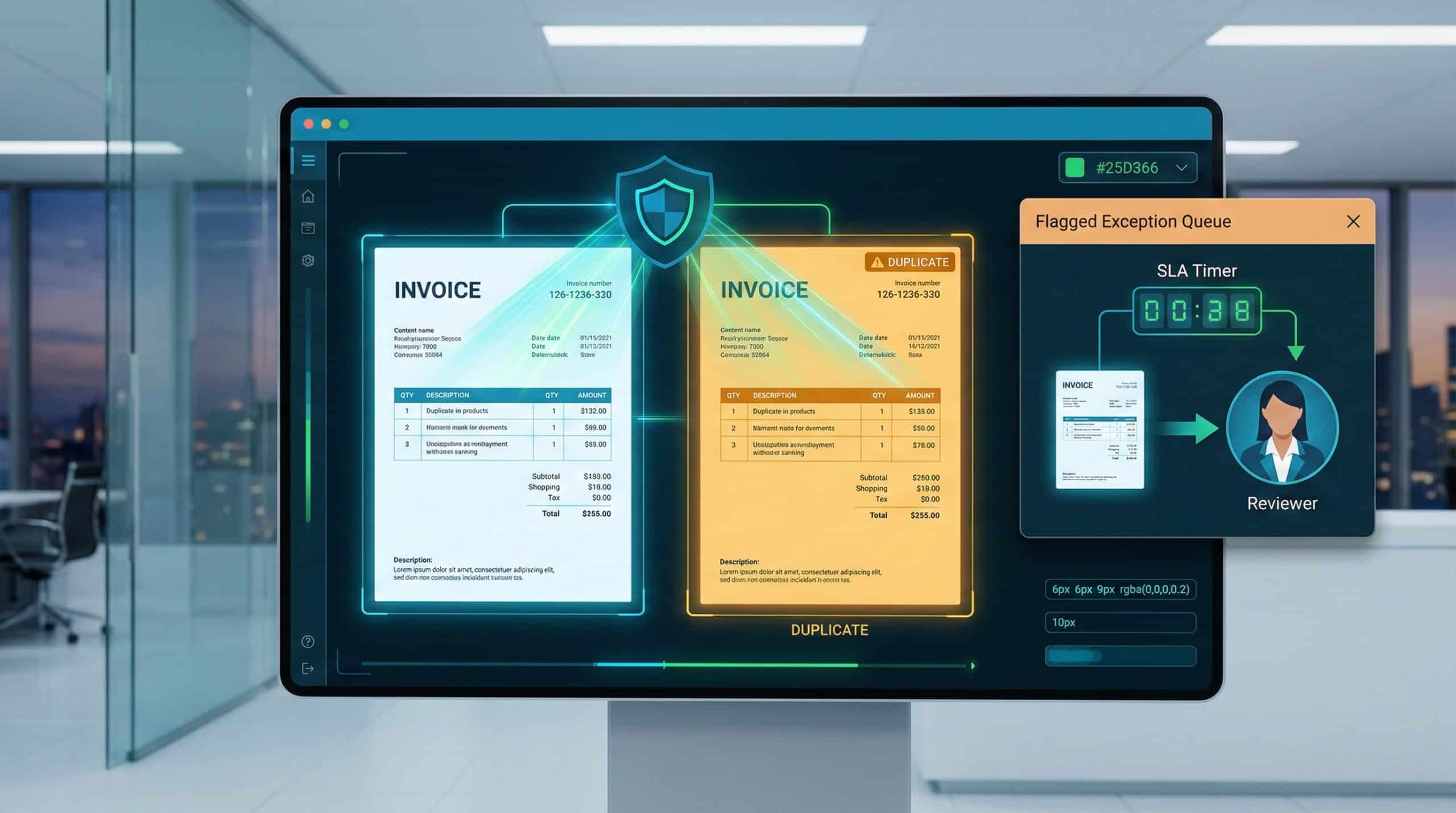
Imagine a supplier sends the same invoice twice, once by email and once through a portal upload. Without automation, each copy might land on a different analyst’s desk. Both get approved. The ERP posts two entries. The payment run sends double the amount. The error surfaces only during bank reconciliation weeks later, triggering a recovery process that consumes management time and damages the supplier relationship.
With automation in place, the system cross-checks every incoming invoice against existing records, matching invoice number, vendor ID, amount, and date. A duplicate is flagged immediately, routed to an exception queue, and blocked from approval until a human confirms or rejects it. The cycle time from detection to resolution drops from weeks to minutes.
How Do You Calculate ROI for Financial Process Automation?
ROI is not a single number; it is a composite of direct savings and indirect value. On the cost side, measure licensing fees, implementation effort, training hours, and ongoing maintenance. On the benefit side, track these metrics before and after deployment:
| Metric | What It Measures | Typical Improvement Range |
|---|---|---|
| Cost per invoice processed | Total AP cost divided by invoice volume | 40-70% reduction |
| Average approval cycle time | Submission to final approval (days) | 50-80% faster |
| Exception rate | Percentage of transactions requiring manual intervention | 20-40% lower |
| Late-payment penalties | Fees paid due to missed deadlines | Near elimination |
| Manual reconciliation hours | Staff hours spent matching records | 30-60% reduction |
Beyond these numbers, consider the value of earlier financial close, improved DPO (Days Payable Outstanding), reduced audit preparation time, and stronger fraud prevention. Together, these factors often generate a positive ROI within the first year of deployment.
Need help identifying the right automation starting point for your finance team? Detelix experts can assess your current ERP workflows and recommend a phased approach that delivers fast ROI with built-in controls.
How Long Does It Take to Implement Financial Process Automation Software?
Timeline depends on scope, system complexity, data quality, and stakeholder availability. A focused pilot automating a single process like invoice approval for one business unit can go live in four to eight weeks. Broader rollouts across multiple processes, entities, and ERP instances typically span three to six months. The key is to resist the temptation to automate everything simultaneously. Start with a defined process, prove value, learn from the pilot, and expand methodically.
Tip
Define your pilot success criteria before deployment begins. Choose two or three measurable KPIs, such as average approval cycle time and exception rate, and commit to a four-week measurement period after go-live. This discipline prevents scope creep and gives leadership concrete evidence to justify the next phase.
What Criteria Matter Most When Selecting a Solution?
Choosing financial process automation software is not just a technology decision; it is an operating-model decision. The wrong choice locks you into rigid workflows or creates a dependency on specialized developers for every change. The table below maps common business needs to evaluation criteria:
| Business Need | What to Evaluate in the Software |
|---|---|
| Rapid deployment without heavy IT projects | Low-code/no-code workflow builder; pre-built templates |
| Audit readiness and regulatory compliance | Immutable audit trail; role-based access; SoD enforcement |
| ERP integration (SAP, Priority, NetSuite, etc.) | Native connectors or open API; error-handling for sync failures |
| Multi-entity or multi-currency operations | Entity-level configuration; currency conversion rules |
| Scalability as transaction volume grows | Cloud-native architecture; performance benchmarks |
| Real-time visibility for CFO and controllers | Dashboards; SLA tracking; exception reporting |
Detelix addresses several of these needs natively. Its platform acts as a continuous control layer over ERP processes, providing real-time alerts on sensitive actions such as changes to supplier bank details, unusual payment patterns, or policy deviations, so finance leaders gain visibility without slowing operations down. Because it integrates directly with ERP data, there is no need to rebuild existing workflows from scratch; Detelix adds a protection and monitoring dimension on top of what you already have.
Must-Have Capabilities for Any Financial Workflow Automation Platform
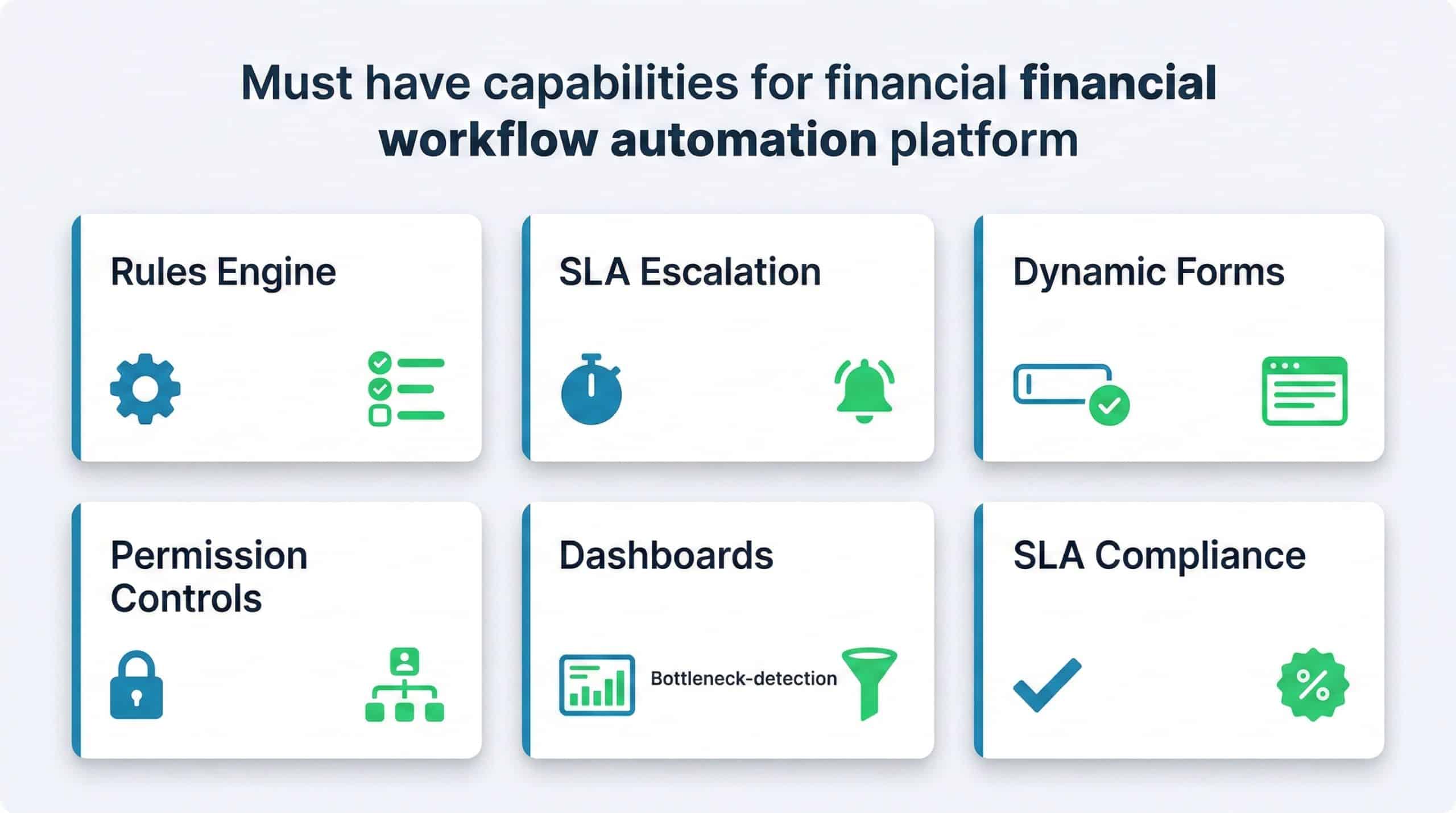
Beyond the selection criteria above, certain features are non-negotiable for a finance-grade solution: a configurable rules engine that supports multi-level approvals, SLA escalation timers, dynamic form fields with validation logic, and granular permission controls. On the reporting side, expect built-in dashboards showing processing times by stage, bottleneck identification by approver, recurring exception types, and SLA compliance rates.
Why Does UX Determine Adoption Success?
If approvers need ten clicks and three screens to review and approve an invoice, adoption will stall. The best platforms minimize friction: single-screen review with all relevant data visible, one-click approval or rejection, mobile-friendly interfaces for on-the-go decision-makers, and full-text search across documents and records. When the tool is easier than the old way, adoption takes care of itself.
Did You Know
Studies on enterprise software adoption consistently show that reducing the number of clicks to complete a task by even 30% can improve user adoption rates by over 50%. For finance automation, this means single-screen approval views and mobile-responsive interfaces are not luxuries; they are adoption prerequisites.
How Does Automation Support Financial Close and Management Reporting?
Month-end close is often a pressure cooker. Tasks are tracked in spreadsheets, status updates are exchanged via email, and the CFO learns about delays only when deadlines are missed. Automation transforms this by centralizing a close checklist broken down by entity, task owner, and due date with real-time status visibility. Each task has a defined workflow: prepare, review, approve, lock. Completion triggers the next dependent task automatically. When the CFO opens the dashboard on day three of close, the status of every line item is visible without sending a single email.
How Does Reconciliation Automation Reduce Late Closes?
Automated reconciliation engines match transactions across systems, including bank feeds against GL entries, intercompany balances, and sub-ledger details, and surface only the unmatched items for human review. Exceptions are prioritized by materiality and age, assigned to owners with SLA deadlines, and tracked until resolution. This eliminates the last-mile problem where a handful of unresolved items delay the entire close by days.
Tip
Set up automated reconciliation rules that run daily rather than waiting until month-end. Continuous matching surfaces discrepancies immediately, reducing the backlog of unmatched items that typically causes close delays. Even a simple daily bank-to-GL match can shave two or three days off your close cycle.
Connecting Financial Process Automation Software to Your ERP
Integration is where many automation projects succeed or fail. The automation platform needs to read and write data to your ERP reliably, including vendor master records, invoice postings, payment statuses, and GL balances. APIs are the preferred method because they support real-time or near-real-time data exchange with structured error handling. Batch file transfers remain relevant for high-volume, low-urgency data syncs or when working with older ERP versions that lack modern API layers.
Real-Time Integration vs. Batch: When to Use Each
Real-time integration is critical for status-sensitive actions: payment approvals, bank-detail changes, or fraud-alert triggers. Batch processing works well for nightly data loads, such as syncing a day’s worth of posted invoices into a reporting warehouse. Most mature deployments use a combination, routing each data flow through the method that balances speed, reliability, and system load.
Preventing Breakage When One System Changes
ERP upgrades, API version changes, and field-mapping modifications can silently break integrations. Protect against this with versioned API contracts, automated regression tests that run after every system update, and a centralized integration map documenting every data flow, field mapping, and transformation rule. Detelix’s approach of monitoring ERP actions at the data level means it can detect anomalies even when upstream changes alter expected patterns, providing an independent safety net that operates regardless of integration-layer shifts.
Did You Know
A single undetected integration failure between an automation platform and an ERP can silently block hundreds of invoices from posting, creating a backlog that takes days to untangle. Organizations that implement automated health-check pings between systems detect these failures within minutes rather than discovering them during month-end reconciliation.
What Are the Risks of Financial Process Automation and How Do You Mitigate Them?
Automation introduces its own risk profile. Over-reliance on automated rules can create blind spots if those rules are not regularly reviewed. Poor data quality upstream produces confident-looking but incorrect outputs downstream. And a system outage in a fully automated workflow can halt critical processes entirely. Mitigation strategies include periodic rule reviews at least quarterly, data-quality checks at the point of entry, and defined fallback procedures for system downtime.
Detelix helps here by serving as an independent monitoring layer. Even when automated workflows run smoothly, the platform continuously cross-checks ERP actions against expected behavior, flagging deviations that the workflow itself was not designed to catch. This is the difference between automating a process and actually controlling it.
Comparing Approaches: Workflow Automation vs. BPM vs. ERP-Native Tools
| Approach | Strengths | Limitations |
|---|---|---|
| Financial Workflow Automation | Purpose-built for finance; fast deployment; strong audit trail | May require integration to ERP; limited outside finance scope |
| BPM Suites | Highly flexible; supports complex cross-department processes | Longer implementation; requires technical skills to configure |
| ERP-Native Workflow | Tight integration; no middleware needed | Limited customization; upgrade dependencies; weaker UX |
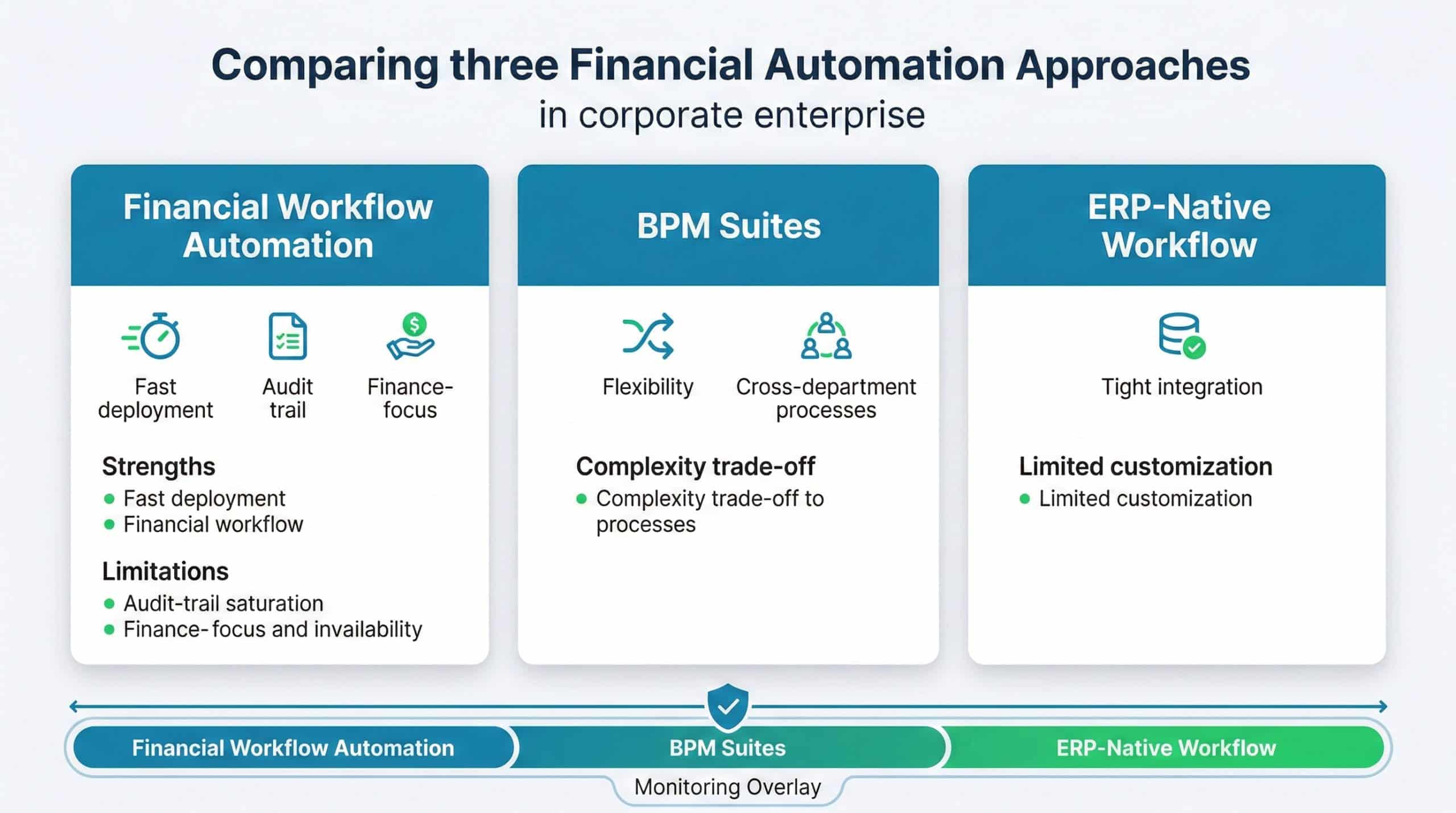
Most organizations benefit from a layered approach: use ERP-native capabilities where they are adequate, supplement with purpose-built workflow automation for finance-specific processes, and overlay a continuous-monitoring solution like Detelix to ensure that what should happen in the system is actually what does happen.
Tip
Do not treat the choice between workflow automation, BPM, and ERP-native tools as mutually exclusive. Map each finance process to the approach that fits its complexity and control requirements. Invoice approval may work perfectly with a purpose-built workflow tool, while a complex multi-department procurement process may need a BPM suite. Layer Detelix on top of all of them for unified monitoring.
How Does Automation Reduce Human Error in Sensitive Financial Data?
Every manual data entry point is a potential error source. A mistyped digit in a bank account field can redirect a payment to the wrong recipient. A copy-paste error in an invoice amount can cause a material misstatement. Automation reduces these risks through field-level validations including format checks, range limits, and cross-reference lookups, mandatory fields that prevent incomplete submissions, and system-to-system data transfer that bypasses manual re-keying entirely. When combined with Detelix’s real-time alerting on anomalies, such as a sudden change to a long-standing vendor’s bank details, the organization gains both prevention and detection in a single operational model.
Implementation Roadmap: From Pilot to Enterprise Scale
A phased approach protects both budget and credibility. Phase one selects a single high-impact process, typically AP invoice approval, defines success metrics, and deploys within weeks. Phase two extends to adjacent processes such as expense management, vendor onboarding, and bank reconciliation, applying lessons learned from the pilot. Phase three introduces advanced capabilities: IDP, predictive analytics, and cross-process dashboards. Throughout, governance matters. The Bank of Israel’s NBT 364 directive on IT risk management offers a useful framework for ensuring that automation deployments are conducted with proper controls, change management, and ongoing oversight.
Did You Know
The Bank of Israel’s NBT 364 directive explicitly addresses IT risk governance for automated systems, requiring organizations to maintain documented change-management procedures, periodic control reviews, and contingency plans for system failures. Finance teams that align their automation rollout with this framework gain both regulatory compliance and operational resilience.
What Should the Finance Team’s Role Look Like After Automation?
Automation does not eliminate finance roles; it elevates them. Analysts who once spent 70% of their time on data entry and reconciliation now spend that time on variance analysis, forecasting, and business partnering. Controllers shift from policing transactions after the fact to designing and monitoring automated control frameworks. The CFO gains real-time dashboards instead of stale reports, enabling faster and more informed decisions. This is the essence of finance digital transformation: not fewer people, but people doing higher-value work with greater confidence in the data they rely on.
Detelix ERP Protection and Monitoring Solutions

Proactive Monitoring
Continuous oversight of ERP transactions and master-data changes to detect anomalies before they cause financial damage.

Real-Time Alerts
Instant notifications when sensitive ERP actions occur, including bank-detail changes, unusual payment patterns, and policy violations.

GateKeeper
Automated approval workflows and Separation of Duties enforcement to prevent unauthorized transactions from reaching your ERP.

Experience
Deep domain expertise in ERP security across SAP, Priority, and NetSuite, backed by ISO 27001 and ISO 27799 certifications.
See Detelix in Action
Frequently Asked Questions
Is financial process automation software suitable for small and mid-sized companies, or only for large enterprises?
Modern cloud-based platforms are designed to scale in both directions. Small and mid-sized companies often see faster ROI because their processes are less complex, deployment is quicker, and the relative impact of eliminating manual work is larger. The key is choosing a solution that does not require a large IT team to configure and maintain.
Can automation fully replace the month-end close process?
Automation can handle the mechanical components including data collection, reconciliation matching, checklist tracking, and status reporting. However, judgment calls like reserve estimates, unusual-transaction analysis, and narrative disclosures still require experienced finance professionals. The goal is to free those professionals from administrative overhead so they can focus on the areas that genuinely need their expertise.
How do you ensure data security when automating processes that handle sensitive financial information?
Look for platforms that offer encryption at rest and in transit, role-based access controls, multi-factor authentication, and immutable audit logs. Conduct a DPIA when personal data is involved, and ensure that vendor contracts include clear data-processing obligations. Integrating a continuous-monitoring layer like Detelix adds an additional safeguard by flagging unauthorized access or unusual data modifications in real time.
What happens if the automation system goes down during a critical payment run?
Every deployment should include a documented fallback procedure. This typically involves a manual approval path with predefined authorization rules, an offline record of pending transactions, and a reconciliation step once the system is restored. Downtime risk is further mitigated by choosing cloud-hosted solutions with high-availability SLAs and redundant infrastructure.
How do you measure whether automation is actually improving control, not just speed?
Track control-specific KPIs: number of policy exceptions detected and resolved, SoD violations prevented, unauthorized master-data changes flagged, and time-to-detect for anomalies. If these metrics improve alongside processing speed, you know the automation is strengthening governance, not just accelerating throughput.
Ready to Move From Routine Monitoring to Real Control?
If your finance team is still chasing approvals through email and discovering errors at month-end, the gap between your current state and genuine operational control is wider than it appears. Detelix closes that gap with continuous, real-time, independent oversight.